What Is CPM and Why Did Mine Suddenly Jump? Causes and How to Read It in Reports
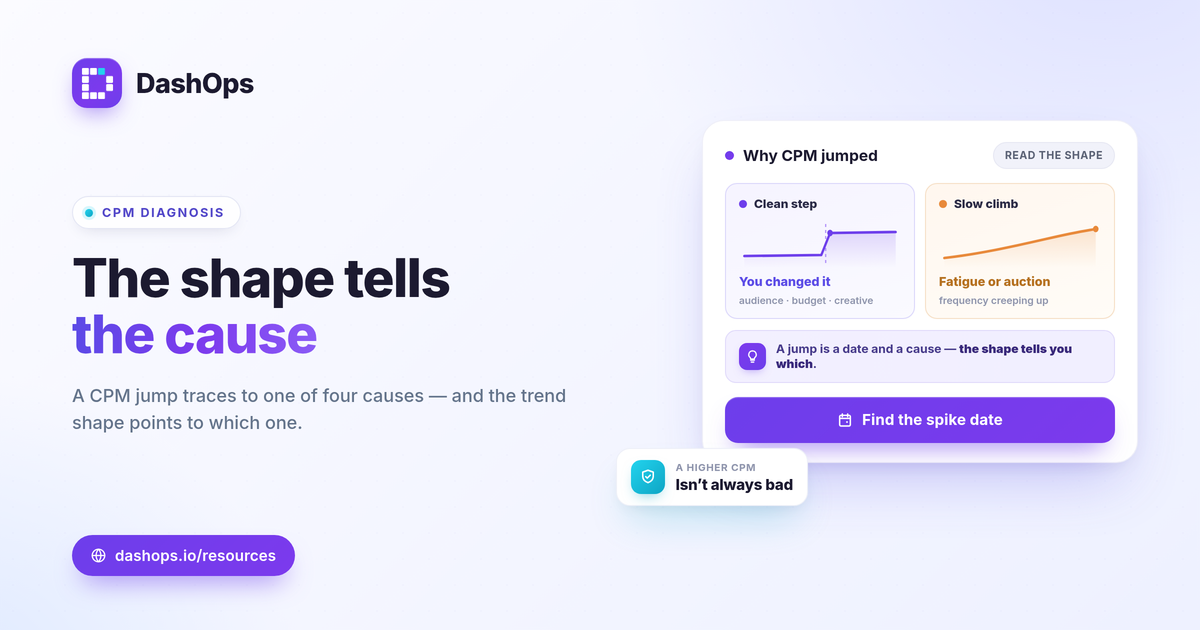
A CPM jump means Meta charged you more to show your ads to a thousand people than it did before, and the cause is almost always one of four things: a more competitive auction, a seasonal demand spike, a narrow or saturated audience, or creative fatigue. CPM is not a result you control directly; it is the price of attention in an auction, and it moves when supply, demand, or your own targeting change. The fastest way to answer “why did my CPM jump Facebook ads” is to find the exact day it moved on a trend chart, then line that date up against what changed in your account, the calendar, and your audience. This guide walks through the causes and how to read them in reports.
What CPM actually measures
CPM is cost per mille, the cost for one thousand impressions. The formula is simple:
- CPM = spend / impressions times 1000.
It tells you the price of reaching people, not whether they acted. That distinction matters because a rising CPM is not automatically bad. If your CPM climbs but your CTR and cost per result hold or improve, you are paying more per thousand views but still getting efficient outcomes. If CPM rises and your downstream metrics worsen with it, that is when you have a real problem to chase. Always read CPM next to CTR, CPC, and cost per result rather than on its own. For a fuller map of how these connect, see the Meta ad metrics worth tracking and CPM vs CPC explained.
Why did my CPM jump? The four common causes
Most sudden CPM spikes trace back to one of these. The skill is matching the spike date to the right cause.
- Auction competition. Meta runs an auction for each impression. When more advertisers chase the same people, the clearing price rises and your CPM goes up even though nothing in your account changed. This is the most common cause of a CPM increase that appears across many accounts at once.
- Seasonality and demand peaks. Costs climb when advertiser demand surges: holiday shopping windows, major sale events, election periods, and other calendar-driven crunches. These are predictable if you look at the same period last year.
- Audience size and targeting. A small, narrow, or heavily overlapping audience gives the auction fewer people to serve, so each impression costs more. Tightening targeting or stacking exclusions can quietly push CPM up.
- Creative fatigue. When the same people see the same ad repeatedly, Meta has to work harder, and cheaper placements get exhausted. Rising frequency alongside rising CPM is the classic fingerprint of fatigue.
A sudden CPM spike in Meta ads usually has a single dominant driver, even if two or three are nudging it. Your job in the report is to isolate which one.
How to read a rising CPM in your reports
The single most useful move is to stop looking at one number and start looking at the trend. A period-over-period comparison and a daily trend chart turn a vague “costs went up” into a precise “CPM stepped up on the 9th.”
- Find the inflection date. Pull CPM as a daily trend line over the last 30 to 60 days. A clean step up on a specific day points to something you changed (new audience, budget jump, creative swap). A slow, steady climb points to fatigue or a shifting auction.
- Compare to the prior period. Set this period against the one before it. If CPM is up double digits versus last month, that is your signal to dig, not a number to panic over in isolation.
- Check frequency alongside CPM. If frequency is climbing as CPM climbs, fatigue is the leading suspect. Frequency as a fatigue signal explains how to read it.
- Segment by breakdown. Use demographic (age and gender) and placement breakdowns to see whether the whole account moved or just one slice. A CPM spike isolated to one placement or one age band is a targeting story, not an auction-wide one.
This is exactly where a reporting dashboard beats scrolling Ads Manager date ranges by hand. If you want the difference spelled out, see Ads Manager versus a reporting dashboard.
Is a higher CPM actually a problem?
There is no universal “good” CPM. A number that is fine for a broad e-commerce campaign can be expensive for a narrow local audience, and vice versa. Judge it against three things instead of a benchmark from the internet:
- Your own prior period. The most honest comparison is your account last month or last quarter, not someone else’s average.
- Your margin and goal. Higher CPM is tolerable when the resulting cost per purchase or cost per lead still clears your break-even math. Break-even ROAS = 1 / profit margin is the line that matters, not CPM in isolation.
- The downstream metrics. If CPM rose but CTR and cost per result held, the campaign is still doing its job. The CPM increase is a cost-of-attention story, not a performance failure.
One more caveat for reporting honesty: iOS privacy changes (ATT) cause Meta to undercount some conversions, so a campaign can look worse on cost-per-result than it really is. CPM itself is an impression-side number and is not distorted by that undercount, which is part of why it is a reliable early indicator. For the conversion side, see iOS underreporting in Meta ads.
A quick triage checklist
When CPM jumps, work through this in order:
- Confirm the spike date on a daily CPM trend chart.
- Rule out seasonality by comparing the same window last year or last quarter.
- Check frequency for a fatigue signal.
- Open breakdowns to see if it is account-wide or one segment.
- Read CPM next to CTR and cost per result before deciding it is a problem.
If you manage reporting for clients or across several accounts, a rising CPM is also a question you will be asked, so having the trend ready matters. DashOps reads CPM and 17 plus other Meta KPIs across all your ad accounts in one dashboard, with period-over-period comparison, daily trend charts, frequency, and demographic and placement breakdowns built in, so you can pinpoint when a spike started and explain it in a white-label client report. See what each plan includes on the pricing page, and the help center covers connecting an account and setup.
The practical takeaway: a CPM jump is a date and a cause, so find the day it moved on a trend chart first, then read it next to your downstream results before deciding it is a problem.
Frequently asked questions
Why did my CPM suddenly jump on Facebook ads?
Is a high CPM always bad?
How do I tell if rising CPM is from creative fatigue?
See it in your own dashboard
DashOps brings Meta Ads reporting, campaign management, and white-label client portals into one place. Pick the plan that fits how you run ads.