Facebook Lead Ads Reporting for Home Services: Measuring Cost Per Lead by Job Type
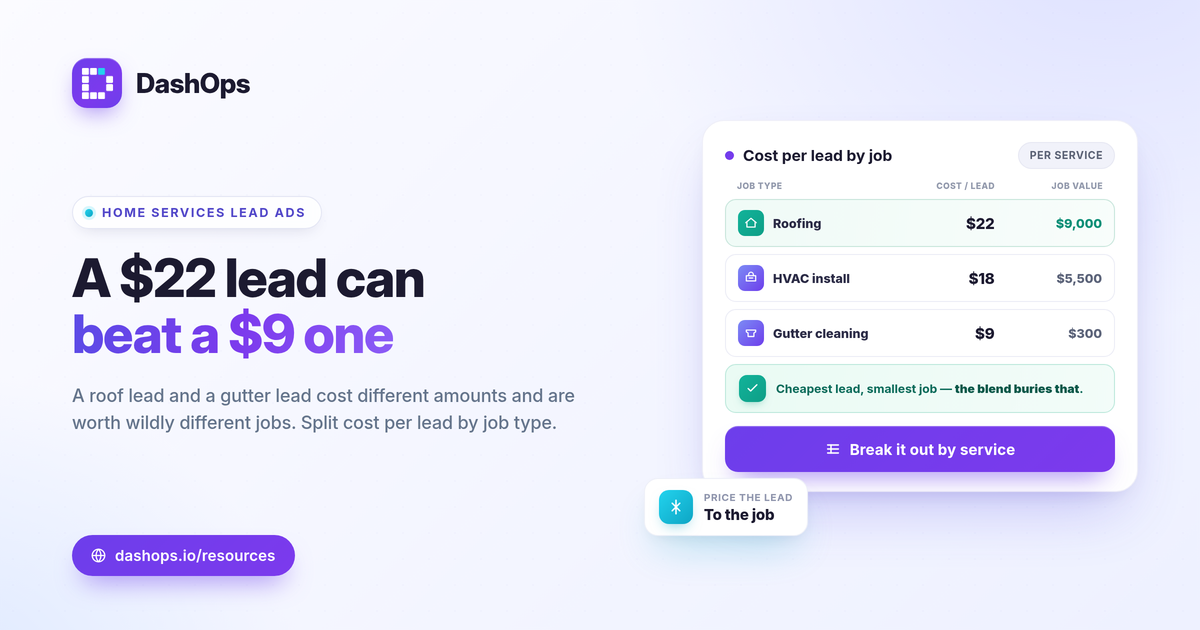
Facebook lead ads reporting for home services comes down to one number that matters more than total leads: cost per lead by job type. A roof replacement lead and a gutter cleaning lead cost different amounts to acquire and are worth wildly different amounts to your business, so a single blended cost per lead hides where your budget is actually working. The fix is to separate leads by the job they asked about, track the spend behind each, and push every lead into follow-up fast. This guide shows how to structure that reporting and route Instant Form leads into your workflow without losing them.
Why one blended cost per lead misleads home services
If you run HVAC, roofing, plumbing, electrical, remodeling, or any multi-service home business, you are not buying one kind of lead. You are buying several, and they do not share economics.
- Job value varies by an order of magnitude. A furnace install and a filter swap are not the same opportunity, so paying the same cost per lead for both means very different returns.
- Demand is seasonal and weather-driven. AC leads spike in summer, heating in winter. A blended average smooths over the swings you need to see.
- Close rates differ by job. Emergency repairs close fast. Large remodels take weeks. Cost per lead alone does not tell you which campaign is feeding revenue.
The calculation itself is simple: cost per lead equals spend divided by leads. The work is doing that math per job type instead of across the whole account, so you can see which services are cheap to fill and which are draining budget.
Structure campaigns so job type is reportable
You can only report cost per lead by job type if your account is built to separate it. Contractor Meta ads reporting gets much easier when the structure does the sorting for you.
- One campaign or ad set per job type. Separate roofing, HVAC, gutters, and remodeling rather than mixing them under one generic “home services” campaign. Spend then attributes cleanly to each job.
- A dedicated Instant Form per service. When the form itself asks about a specific job, the leads arrive already labeled, and your follow-up team knows what each person wants.
- Consistent naming. Put the job type in the campaign name so any HVAC lead reporting Facebook view, or any export, groups the way you expect.
If you are still deciding how granular to go, this overlaps with how you would build any lead-gen Facebook ads report. The principle is the same: structure first, report second.
The KPIs that matter for a home services lead dashboard
A focused home services lead dashboard answers three questions per job type: how many leads, at what cost, and trending which way. Start with these and resist the urge to chart everything Meta returns.
- Leads and cost per lead, per job type. The headline pair. Spend beside results, broken out by service.
- Lead volume trend. A period-over-period comparison tells you whether this week or month beat the last, which is the real question behind any number.
- Spend pacing. Whether each job-type campaign is on track to hit its budget, or burning too fast on a service that is not converting.
- CPC, CPM, and CTR as diagnostics. When cost per lead climbs, these show whether the cause is rising delivery cost (CPM) or weaker ad engagement (CTR). CPM equals spend divided by impressions times 1000. CTR equals clicks divided by impressions.
To go deeper on which metrics to prioritize, the Meta ads KPIs to track guide covers each one and when it matters.
What counts as a good cost per lead here
There is no universal “good” home services cost per lead, and any source quoting one number across all trades is guessing. Judge it against three things you actually control.
- Job value and margin. A lead for a high-ticket install can cost far more than a lead for a small repair and still be profitable. Work backward from what the job is worth and your close rate.
- Your own prior periods. The most honest benchmark is last month. A period-over-period comparison shows whether cost per lead is rising or falling for each job type.
- Lead quality, not just count. Cheap leads that never book are expensive. Cost per lead is only half the picture, so pair it with how many leads actually turn into scheduled jobs. The difference between cost per lead and lead quality is where a lot of budget decisions go wrong.
Get leads into follow-up before they go cold
For home services, speed to first contact often decides whether a lead books. Reporting that sits in a dashboard while leads age does not help. The point is to move them into your follow-up workflow fast.
- Export Instant Form leads as they arrive. Pull leads to CSV or Excel and hand them to whoever calls back, or feed them into your scheduling tool.
- Mind the retention window. Meta only lets you download Instant Form leads directly from the Page for a limited window, about 90 days. After that, leads must be retrieved through the API or a connected tool, so do not rely on the Page as long-term storage.
- Keep a regular export rhythm. Deciding how often to export lead ads data up front means no lead falls outside the window.
A connected dashboard removes the manual step here: leads flow in continuously, stay exportable past the Page limit, and reach your team while the job is still warm.
A note on attribution for lead gen
Lead ads sit a step before the sale, so reconcile what Meta reports with what your office books. The iOS App Tracking Transparency changes cause Meta to undercount some conversions and downstream events, which means the number on the dashboard and the number on your booking calendar will not always match. Treat Meta-native figures as directional for optimization, and trust your CRM or booking system for true revenue. For client-facing or franchise-level views, white-label reports keep the presentation clean without hiding this nuance.
Where DashOps fits
DashOps reads every Meta KPI across your ad accounts in one dashboard with period-over-period comparison built in, so you can break cost per lead out by job-type campaign and watch lead volume trend week over week. It captures Meta Instant Forms leads and exports them to CSV or Excel for your follow-up workflow, and for agencies or multi-location brands it offers white-label client reports and read-only share links. See what each plan includes on the pricing page, and the help center walks through connecting your ad account. If client delivery is your focus, the guide to white-label client reporting is a useful next read, and if you are weighing the dashboard against native tools, see Ads Manager vs a reporting dashboard.
The practical takeaway: separate your campaigns by job type, judge cost per lead against margin and your own prior periods, and export every lead into follow-up before the 90-day window closes.
Frequently asked questions
How do I track cost per lead by job type for home services?
What is a good cost per lead for HVAC or contractor Facebook ads?
How long can I download Facebook Instant Form leads?
See it in your own dashboard
DashOps brings Meta Ads reporting, campaign management, and white-label client portals into one place. Pick the plan that fits how you run ads.