Why Are Facebook Ad Conversions Lower Than Actual Sales? 7 Reasons and How to Reconcile Them
Facebook ad conversions are usually lower than your actual sales because Meta only counts conversions it can confidently tie back to an ad click or view, and a meaningful share of real buyers cannot be matched. Attribution windows, iOS privacy limits, cross-device journeys, and tracking gaps all cause Meta conversions undercount in your reports. The fix is not to make the numbers match exactly, which they rarely will, but to reconcile Meta reported sales against your own back-end revenue on a consistent basis so you know the size and direction of the gap. Below are the seven most common reasons for the ad attribution discrepancy and a practical way to reconcile them in your reporting.
Reason 1: The attribution window is too short to catch the full journey
Meta credits a conversion only if the purchase happens inside the attribution window after a click or view. If someone clicks your ad, thinks it over for a week, and buys on day nine under a 7-day-click window, Meta will not count that sale even though the ad started it.
- Shorter windows undercount more. A 1-day-click setting will always credit fewer purchases than a 7-day-click setting.
- Your sales data has no window. Your store or CRM records the sale whenever it happens, so a longer real-world consideration cycle widens the gap.
If you sell something people deliberate over, expect Meta to lag your true revenue.
Reason 2: iOS and App Tracking Transparency block signal
Since Apple’s App Tracking Transparency prompt, many iPhone users opt out of tracking. When that signal is missing, Meta cannot reliably attribute their conversions, so it either undercounts them or estimates them through modeling. This is one of the largest drivers of Facebook Ads reporting accuracy problems today.
The effect is qualitative but real: conversions from opted-out users are systematically undercounted, which pulls Meta’s reported number below what actually happened. There is no precise universal figure for how much, because it depends on your audience’s device mix. Our iOS underreporting guide goes deeper on the mechanics.
Reason 3: Cross-device journeys break the match
People discover an ad on their phone during a commute and buy later on a laptop. Meta can sometimes stitch these together when a user is logged in across devices, but not always. When the device that converts is different from the device that saw the ad, and Meta cannot connect them, the sale lands in your revenue total but not in Meta’s conversion column.
Reason 4: The Pixel fires inconsistently, so use the Conversions API
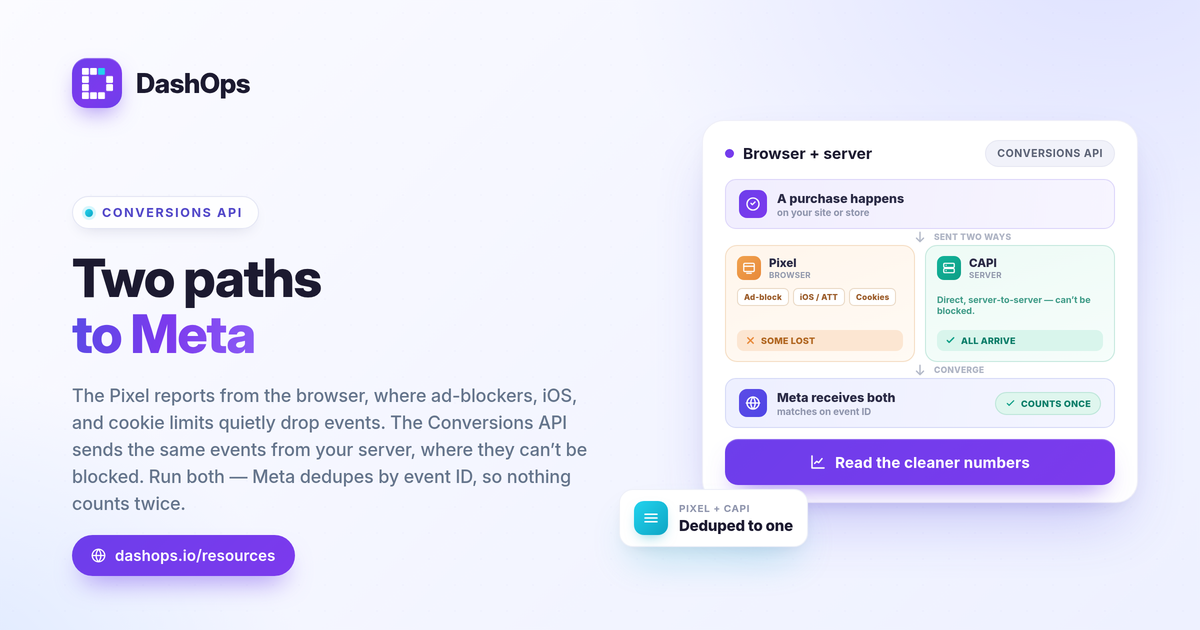
The Meta Pixel runs in the browser, which means ad blockers, cookie consent banners, dropped connections, and privacy settings can stop it from firing. Every missed Pixel event is a real sale that Meta never sees.
The Conversions API (CAPI) is the answer. Instead of relying only on the browser, CAPI sends conversion events to Meta directly from your server.
- Pixel is browser-side and easy to set up, but fragile when the browser blocks it.
- CAPI is server-side and far more resilient, because it does not depend on the user’s browser cooperating.
- Running both together, with event deduplication so a single purchase is not double counted, recovers signal the Pixel alone misses.
CAPI does not invent conversions. It recovers ones that were always real but went unseen. For a fuller walk-through, see Pixel vs Conversions API reporting.
Reason 5: View-through and modeled conversions move the number the other way
Not every discrepancy means undercounting. Meta also includes view-through conversions, where someone saw your ad but did not click before buying, and modeled conversions, which are statistical estimates filling gaps left by missing signal. These can push Meta’s reported figure up in ways your back-end data does not reflect on a one-to-one basis. When you reconcile, separate click-based conversions from view-through and modeled ones so you are comparing like with like.
Reason 6: De-duplication and refunds are counted differently
Meta counts a conversion event when it happens. Your accounting reflects what actually settled.
- Refunds and cancellations reduce your real revenue after the fact, but the original conversion may still sit in Meta’s report.
- Repeat events like a customer who orders twice in the window can be attributed differently than your order system records them.
- Lead-gen quality is a related trap: Meta counts a submitted form, but not every lead becomes a sale, so cost per lead and real pipeline diverge.
This is why the raw counts almost never tie out to the penny.
Reason 7: Date ranges and time zones are misaligned
A surprising amount of the gap is simply mismatched dates. Meta’s reporting time zone may differ from your store’s, and a conversion can be attributed back to the click date rather than the purchase date, shifting it into a different reporting period. Recent days are also unstable, because attribution keeps catching up for several days after the click. Comparing Meta’s last three days to a settled revenue report will always look wrong.
How to reconcile Meta-reported numbers with real revenue
You will not make the two systems agree exactly, and chasing that is wasted effort. The goal is a consistent, explainable gap you can monitor.
- Lock one attribution setting for every report and label it, so a 7-day-click figure is never silently compared to a 1-day-click figure. See Meta ads attribution windows explained.
- Fix the date range and time zone before you compare anything, and exclude the most recent unstable days from period-over-period reads.
- Track the ratio, not the difference. Measure Meta’s reported sales as a share of your real back-end sales each period. Once you know what that share typically looks like for your own account, a stable ratio month after month is itself useful intelligence, and a sudden change in the ratio is the signal worth investigating.
- Implement CAPI so the gap narrows from the tracking side rather than from guesswork.
- Separate click, view-through, and modeled conversions when the breakdown matters for a decision.
The metrics you anchor this on are the same ones that drive every decision: spend, purchases or leads, and ROAS, computed as ROAS = conversion value / spend. For a refresher on which numbers to anchor reporting to, our guide on Meta ads KPIs to track is a good companion.
DashOps reports Meta-native numbers exactly as Meta returns them. It does not perform its own blended or server-side attribution, and it is not a tracking tool, so it will not change what Meta reports. What it does is let you read those numbers consistently: every KPI across your ad accounts in one dashboard, with period-over-period comparison, so you can place Meta’s reported revenue next to your own back-end figure and watch the gap on a fixed cadence rather than rediscovering it every month. This consistency is also why the numbers in Ads Manager can differ from a saved report, covered in Ads Manager vs a reporting dashboard. See what each plan includes on the pricing page, and the help center walks through connecting an ad account.
The practical takeaway: stop trying to make Meta and your sales data match exactly, and instead lock your attribution settings, add the Conversions API, and track the gap as a stable ratio you can explain.
Frequently asked questions
Does DashOps fix Facebook attribution discrepancies?
Should I trust Meta's reported conversions or my own sales data?
Why does my Facebook ROAS look different in two reports?
See it in your own dashboard
DashOps brings Meta Ads reporting, campaign management, and white-label client portals into one place. Pick the plan that fits how you run ads.