Pixel vs Conversions API for Reporting: Which Tracking Method Gives More Accurate Numbers?
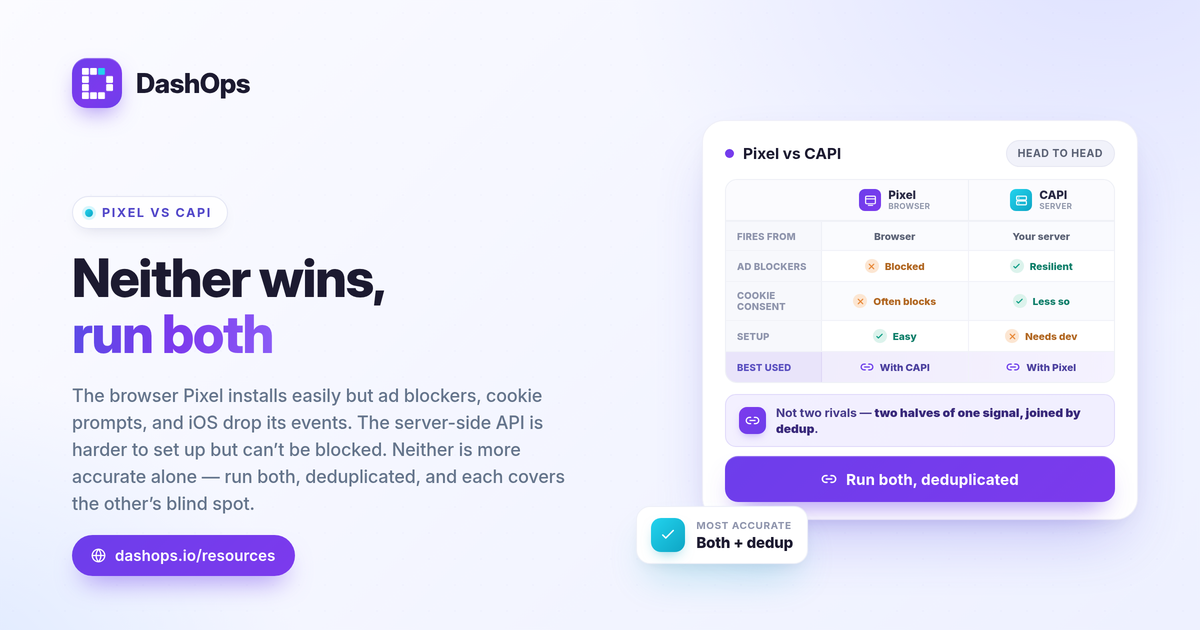
Running both the Meta Pixel and the Conversions API together, with event deduplication, gives the most accurate conversion numbers. On its own, the browser Pixel undercounts because ad blockers, cookie consent prompts, and iOS privacy settings stop events from firing. The server-side Conversions API (CAPI) keeps sending those events from your own server, where the browser cannot block them. Neither method alone is the winner. In Pixel vs Conversions API reporting, the real answer is that they are complementary, and deduplication is what stops them from double counting. Cleaner event data flows straight into the KPIs you read every day, so this is worth getting right before you judge any campaign.
What the Meta Pixel actually does
The Meta Pixel is a snippet of JavaScript on your website. When someone views a page, adds to cart, or completes a purchase, the Pixel fires an event from the visitor’s browser and sends it to Meta.
Browser-side tracking is easy to install and captures rich context automatically. But it depends entirely on the browser cooperating, and several things now interfere:
- Ad and tracking blockers stop the Pixel from loading at all.
- Cookie consent banners can block the Pixel until a visitor accepts, and many never do.
- iOS and ATT privacy settings limit what the browser is allowed to report after a user opts out of tracking.
The result is undercounting. Some real conversions happen but never reach Meta through the Pixel, so your reported numbers come in lower than your actual sales or leads.
What the Conversions API actually does
The Conversions API sends events from your server directly to Meta, rather than from the visitor’s browser. When a purchase or lead is confirmed on your backend, your server makes the call to Meta.
Because it does not run in the browser, server-side tracking sidesteps ad blockers and most browser-level restrictions. That makes CAPI more resilient for the events that matter most, like purchases and lead submissions, which your server already knows about with certainty.
CAPI is not a magic fix on its own, though. It takes more setup, often a developer or a connected tool, and it relies on you passing good customer information for matching. Privacy choices like ATT still shape how Meta can use the data. So Meta Pixel vs CAPI is not a question of one replacing the other.
Why running both with deduplication is the standard
The accuracy answer is to send each important event from both the browser and the server. The Pixel catches the browser context; CAPI catches what the browser blocks. Together they cover more real conversions than either alone.
The catch: if both sources report the same purchase, you risk counting it twice. Event deduplication solves this. You send a shared event ID from both the Pixel and CAPI for the same action. When Meta sees the same ID arrive twice, it keeps one and discards the duplicate.
To get deduplication working:
- Send a matching event name (for example, Purchase) from both sources.
- Send the same unique event ID on the browser event and the server event.
- Check Events Manager for the deduplication status so you can confirm Meta is matching them.
Done right, browser and server-side tracking stop competing and start reinforcing each other. Done wrong, you either lose events or inflate them, and every downstream report inherits the error.
How this affects the numbers in your reports
Conversion tracking accuracy is not an abstract setup detail. It decides whether your cost per result and ROAS reflect reality.
- Undercounted conversions make cost per purchase and cost per lead look worse than they are, and ROAS look lower.
- Double-counted conversions make everything look better than it is, which is more dangerous because you scale spend on a number that is not real.
- Inconsistent tracking over time makes period-over-period comparisons misleading, because a change in your numbers might just be a change in what got tracked.
These are Meta-native metrics, calculated from the events Meta receives. The formulas do not change: ROAS = conversion value / spend, and cost per lead = spend / leads. But the inputs to those formulas are only as good as your event quality. If you want a refresher on which numbers to watch, see the Meta ads KPIs to track.
Where DashOps fits, and where it does not
It helps to be precise here. DashOps reports Meta-native numbers. It does not run its own Pixel, it does not perform server-side or blended attribution, and it does not set up CAPI for you. You configure the Pixel and Conversions API in Meta Events Manager; DashOps then reads the conversion numbers Meta reports.
What DashOps does add is consistency. Once your events are clean and deduplicated, DashOps pulls those KPIs across all your ad accounts into one dashboard with period-over-period comparison, so you can see when conversion volume shifts and ask whether it was performance or a tracking change. That same set of numbers feeds your PDF, Excel, and CSV exports and your white-label client reports, so the dashboard and the report never disagree. See what each plan includes on the pricing page, and the help center covers connecting an account. If you are still deciding between native and pulled reporting, Ads Manager vs a reporting dashboard lays out the difference.
A quick comparison
| Meta Pixel (browser) | Conversions API (server) | |
|---|---|---|
| Where events fire | Visitor’s browser | Your server |
| Blocked by ad blockers | Yes | No |
| Affected by cookie consent | Often | Less so |
| Setup effort | Lower | Higher |
| Best used | Alongside CAPI | Alongside the Pixel |
The pattern is clear. The two columns are not rivals; they are two halves of one accurate signal, joined by deduplication.
For context on why even well-tracked conversions can read lower than your real sales, the Meta Conversions API explained post goes deeper on the mechanics.
The practical takeaway: install both the Pixel and the Conversions API, confirm event deduplication is matching in Events Manager, and only then trust the conversion numbers your reports show.
Frequently asked questions
Is the Conversions API more accurate than the Pixel?
What is event deduplication in Meta?
Does DashOps set up the Pixel or Conversions API for me?
See it in your own dashboard
DashOps brings Meta Ads reporting, campaign management, and white-label client portals into one place. Pick the plan that fits how you run ads.