Facebook Ads Attribution Windows Explained: 7-Day Click vs 1-Day View and What They Change in Reports
Your attribution window decides which conversions Meta credits to your ads, which means it directly moves your ROAS, cost per purchase, and cost per lead even when nothing about your spending changes. Facebook Ads attribution windows explained simply: a 7-day click window counts a conversion if someone clicked your ad up to seven days before buying, while a 1-day view window counts a conversion if someone merely saw your ad within one day. Switch the setting and the same campaign can report a higher or lower return. The fix is not to chase the “right” number but to choose one window and apply it consistently across every report.
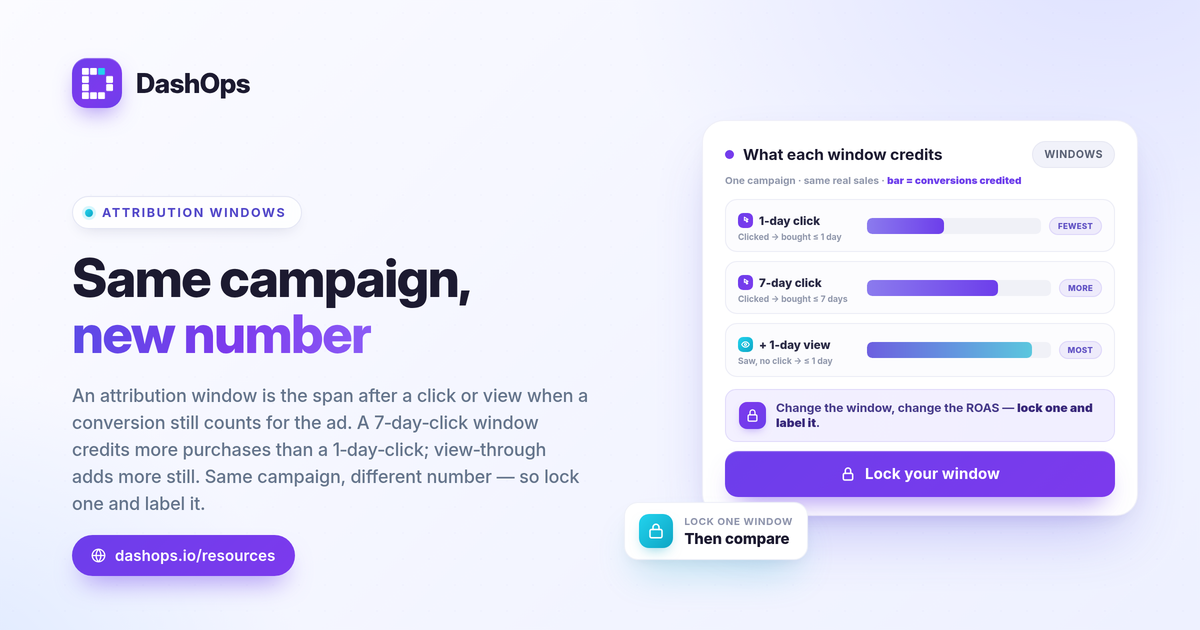
What an attribution window actually is
An attribution window is the time period Meta uses to decide whether a conversion gets credited to an ad. It answers a single question: how long after seeing or clicking your ad can a purchase or lead still count as caused by that ad?
Two things combine to define the window:
- Click-through (the click part). The person clicked your ad, then converted within the window. This is the stronger signal because they actively interacted.
- View-through (the view part). The person saw your ad, did not click, then converted within the window. This is a weaker signal because seeing an ad is not the same as engaging with it.
Meta’s current default for most accounts is 7-day click plus 1-day view. You can change it per ad set in the Meta attribution settings, but the default is what your reports use unless someone deliberately changed it.
7-day click vs 1-day view, side by side
These two settings credit conversions on very different logic. Understanding the contrast is the core of reading any Meta report correctly.
| Setting | What it credits | Signal strength | Effect on reported results |
|---|---|---|---|
| 7-day click attribution | Conversions where the person clicked, then converted within 7 days | Stronger, intent-based | Credits more conversions than a 1-day click window |
| 1-day click attribution | Conversions where the person clicked, then converted within 1 day | Strong but narrow | Credits fewer conversions, more conservative |
| 1-day view attribution | Conversions where the person only saw the ad, then converted within 1 day | Weaker, no click | Adds view-driven conversions on top of clicks |
A wider window credits more conversions, so it tends to show a higher ROAS and a lower cost per result. A narrower window is more conservative. Neither is wrong. They are answering slightly different questions, and the trouble starts when two reports answer different questions without saying so.
How switching the window inflates or deflates ROAS
Here is the part that trips people up. Changing the attribution window changes your conversions and conversion value, but it never changes your spend. Since ROAS = conversion value / spend, moving the numerator alone moves the whole ratio.
- Widen the window (for example from 1-day click to 7-day click and 1-day view) and Meta credits more conversions to the same spend. ROAS goes up, cost per purchase goes down, cost per lead goes down. The campaign looks better without a single dollar changing.
- Narrow the window and the opposite happens. Fewer conversions are credited to the same spend, so ROAS drops and cost per result rises.
Imagine Acme Apparel runs one campaign and pulls two reports. Under 7-day click and 1-day view, the campaign shows a healthy return. Under 1-day click only, the same campaign over the same dates shows a weaker one. Both are correct for their setting. If you compare one report to the other and conclude performance fell, you have been fooled by a settings mismatch, not a real change. This is one of the most common reasons two Meta reports show different ROAS, and it has nothing to do with the ads themselves.
Why view-through and iOS make this messier
Two real-world factors sit on top of the window choice and deserve a calm mention.
- View-through credit can flatter results. A 1-day view conversion means someone saw the ad and later converted without clicking. Some of those people might have bought anyway. Including view-through is a legitimate choice, but it credits more to your ads than a click-only window would, so know whether it is switched on before you read the number.
- iOS and ATT cause undercounting in the other direction. After Apple’s App Tracking Transparency prompt, many users opt out of tracking, so Meta cannot observe every conversion it actually drove. The practical effect is that Meta-reported conversions are undercounted compared to what truly happened. This pushes reported ROAS down, partially offsetting the inflation a wide window can add. The two effects do not cancel cleanly, which is exactly why a single consistent window matters more than hunting for a perfect one.
To close the gap between Meta-reported conversions and your real sales, many advertisers send server-side signals through the Conversions API alongside the Pixel. That improves what Meta can measure, but it is a separate topic from window choice. For the reporting side, the key point is that DashOps reports Meta-native numbers and does not perform its own blended or server-side attribution. It reads the figures Meta returns and presents them consistently, so the attribution window you chose is the one every chart reflects. If you want the deeper measurement context, see Meta Conversions API explained.
How to keep window choice consistent in your reports
The goal is comparability. A report is only useful if this month’s numbers can be trusted against last month’s, and that breaks the moment the window silently changes.
- Decide once. Pick the window that matches how you think about your business. Many advertisers report on 7-day click and 1-day view because it is Meta’s default and credits genuine click-driven conversions.
- Write it down. Note the chosen window where readers can see it, especially on client reports, so nobody assumes a different setting.
- Apply it everywhere. Use the same window on dashboards, exports, scheduled digests, and white-label client reports. A figure that shifts because the window changed is not a performance story.
- Compare like with like. When you look at a period-over-period trend, confirm both periods use the same window before you read meaning into the change.
This is where a dashboard earns its place over manual exports. DashOps reads your Meta KPIs, including ROAS, cost per purchase, and cost per lead, across every ad account with period-over-period comparison built in, and the same window choice flows through to your shared links and white-label reports. That keeps a client looking at a white-label client report and you looking at the live dashboard reading the same numbers. See what each plan includes on the pricing page, and the help center covers setup. For a wider view of which numbers to watch, the Meta Ads KPIs to track guide pairs well with this one.
The practical takeaway: the attribution window is a reporting choice, not a performance result, so lock one window in and judge every campaign against the same y
Frequently asked questions
What is the default Facebook Ads attribution window?
Does changing the attribution window change how much I actually spent?
Which attribution window should I report to clients?
See it in your own dashboard
DashOps brings Meta Ads reporting, campaign management, and white-label client portals into one place. Pick the plan that fits how you run ads.