What Is Cost Per Purchase in Facebook Ads and How Do You Lower It?
Cost per purchase in Facebook ads is the average amount you spend to generate one sale, and the cost per purchase formula is simple: ad spend divided by the number of purchases. If you spent 1,000 on ads and Meta recorded 50 purchases, your cost per purchase is 20. It is the e-commerce ad cost metric that tells you, in plain money terms, what each sale costs to buy. To lower cost per purchase Facebook ads advertisers usually work on three levers: the offer and creative that drive the conversion, the audience and placement mix, and the landing experience after the click. Below is how the metric works and how to bring it down without guessing.
What is cost per purchase in Facebook ads?
Cost per purchase is the cost side of every sale your ads produce. It answers a single question: how much did I pay to make this purchase happen.
- The formula. Cost per purchase = spend / purchases. It is sometimes called CPA when the purchase is your conversion event.
- Where the number comes from. Meta counts purchase events reported by your pixel or Conversions API, then attributes them to ad clicks or views inside your chosen attribution window.
- Why it matters for e-commerce. Spend and ROAS tell you the return, but cost per purchase tells you the unit economics of acquiring a customer, which is what you compare against your average order value and margin.
If you want a wider view of how this metric sits alongside the rest of your account, see Meta ads KPIs to track.
Cost per purchase vs ROAS: read them together
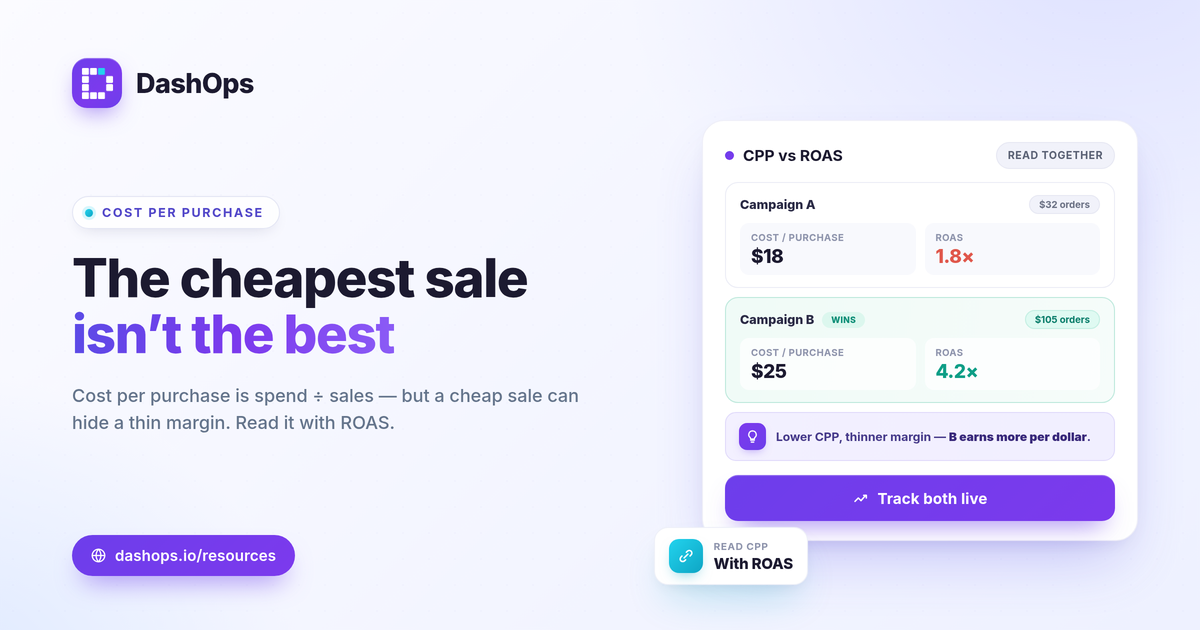
Cost per purchase and ROAS describe the same campaign from two angles, and neither is complete on its own.
- Cost per purchase is the cost to win one sale. A lower number is better, all else equal.
- ROAS is conversion value divided by spend, so it folds in how much each purchase is worth. ROAS = conversion value / spend.
A campaign can show a low cost per purchase but a weak ROAS if it is buying small orders. Another can show a higher cost per purchase yet a strong ROAS because order values are large. Read them side by side so a cheap-looking sale does not hide a thin margin. The breakdown in ROAS vs CPL vs CPA explained walks through how these metrics relate.
What is a good cost per purchase on Meta ads?
There is no single good cost per purchase Meta ads figure, and any source that quotes a universal number is guessing. The honest way to judge it is against your own economics.
- Compare it to average order value. Cost per purchase has to leave room for product cost, shipping, and margin once subtracted from what each order brings in.
- Compare it to break-even. Your break-even ROAS is 1 / profit margin. Translate that into the maximum cost per purchase your margin can absorb, and treat that ceiling as your line in the sand.
- Compare it to your own trend. A period-over-period view shows whether cost per purchase is climbing or falling versus last month, which matters more than any outside benchmark.
For a worked view of the return side, what is a good ROAS for ecommerce Facebook ads covers how to set a target you can defend.
How to lower cost per purchase in Facebook ads
Lowering cost per purchase means either spending less to get the same sales or getting more sales from the same spend. A few levers move it reliably.
- Tighten the offer and creative. The ad that earns the click and the offer that closes the sale do most of the work. Weak creative raises cost per purchase faster than almost anything else.
- Watch frequency for fatigue. When the same people see an ad too often, response drops and cost per purchase drifts up. Frequency is a real KPI you can track, and rising frequency with falling results is a fatigue signal. The piece on reach vs impressions vs frequency explains how to read it.
- Cut wasted placements and audiences. A placement or age and gender segment that spends without converting drags your blended cost per purchase higher. Demographic and placement breakdowns show you where the money is going.
- Fix the post-click experience. A slow or confusing landing page wastes clicks you already paid for. Lower friction between the ad and the checkout lifts conversion rate and pulls cost per purchase down.
- Let efficient campaigns scale, pause the rest. Move budget toward the campaigns with the lowest cost per purchase rather than spreading it evenly.
Why your Meta cost per purchase may not match your store
Before you react to the number, make sure it is the right number. Meta and your store often disagree, and that gap is normal.
- Attribution windows. Meta credits purchases inside a set window after a click or view, so its purchase count can differ from your store total for the same dates.
- iOS and tracking limits. App Tracking Transparency means some conversions never get reported back to Meta, which tends to undercount purchases. That undercounting can make cost per purchase look higher in Meta than your real economics suggest.
- The fix. Reconcile Meta against your store totals so you are optimizing toward reality, not toward a partial picture. Why are Facebook ad conversions lower than sales goes deeper on closing this gap.
Tracking cost per purchase over time
A single snapshot of cost per purchase is hard to act on. The useful version is the trend: is it stable, climbing, or falling, and which campaigns are responsible. That requires pulling spend, purchases, ROAS, and frequency into one place where you can compare this period to the last without rebuilding a spreadsheet every week.
DashOps surfaces cost per purchase for e-commerce ad accounts automatically, next to ROAS, spend, and the demographic and placement breakdowns that explain why the number is moving, all with period-over-period comparison built in. You can see what each plan includes on the pricing page, and the help center covers connecting your ad accounts and reading the e-commerce KPIs.
The practical takeaway: judge cost per purchase against your own margin and last period, not a borrowed benchmark, and watch it next to ROAS so a cheap sale never hides a thin one.
Frequently asked questions
What is the formula for cost per purchase in Facebook ads?
What is a good cost per purchase on Meta ads?
Why is my Facebook cost per purchase higher than my real numbers?
See it in your own dashboard
DashOps brings Meta Ads reporting, campaign management, and white-label client portals into one place. Pick the plan that fits how you run ads.