What Is a Good ROAS for E-commerce Facebook Ads?
The short answer
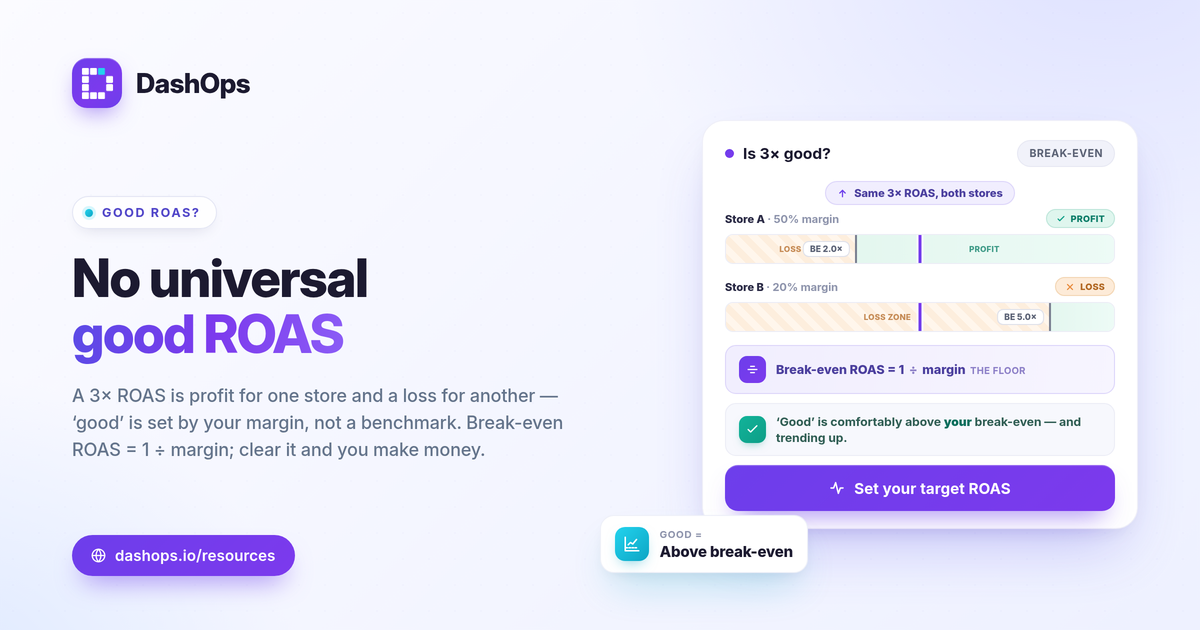
There is no single “good” ROAS for e-commerce Facebook Ads, and any article that gives you one universal number is guessing. A good ROAS for ecommerce Facebook Ads is whatever clears your break-even point with enough margin left over to be worth the effort. Break-even ROAS is the formula that matters: 1 divided by your profit margin. A store with a 50 percent margin breaks even at 2.0x, so a 3x ROAS is healthy there. A store with a 20 percent margin breaks even at 5.0x, so that same 3x is losing money. The right question is not “is 3x good,” it is “is 3x above my break-even, and is it trending the right way.”
Why a single benchmark number is misleading
Two stores can run identical campaigns and reach opposite conclusions about the same ROAS, because the number that decides profit lives outside the ad account.
- Margins differ. A handmade-goods brand and a drop-shipped gadget store have completely different cost structures, so the same ROAS means profit for one and loss for the other.
- Price points differ. A store selling a single high-ticket item can survive on a lower ROAS than one selling cheap impulse buys, because fixed per-order costs eat a bigger share of a small order.
- Goals differ. A brand chasing first purchases to build a repeat-buyer base may accept a low or break-even ROAS on acquisition, betting on lifetime value. A store with no repeat purchasing cannot.
So the useful comparison is never against a stranger’s account. It is against your own margin, your own prior period, and your own goal.
Calculate your break-even ROAS first
Before you can call any number good, you need the one figure that turns ROAS into a profit-or-loss verdict. Break-even ROAS is the point where ad-driven revenue exactly covers the cost of the goods plus the ad spend.
The formula is simple:
- Break-even ROAS = 1 / profit margin
Your profit margin here is the gross margin on an order after product cost, shipping, payment processing fees, and any per-order packaging or fulfilment costs. Work it out as a decimal. A 40 percent margin is 0.40, and 1 / 0.40 = 2.5, so your break-even ROAS is 2.5x. A 25 percent margin gives 1 / 0.25 = 4.0x.
Here is how break-even moves with margin:
| Profit margin | Break-even ROAS |
|---|---|
| 20% | 5.0x |
| 30% | 3.3x |
| 40% | 2.5x |
| 50% | 2.0x |
| 60% | 1.7x |
Anything at the break-even line means the campaign paid for itself and the product, with zero profit. To actually make money, your target ROAS needs to sit above break-even by enough to cover overhead, returns, and the margin you want to keep.
Set a target ROAS, not a wish
Once you know break-even, your target ROAS for ecommerce, sometimes called your target ROAS DTC goal, is a deliberate number you choose, not Meta’s reported figure you hope for.
- Start from break-even. That is the floor. A ROAS below it is unprofitable no matter how good it looks.
- Add your required profit. If you need a 20 percent net profit on ad-driven sales, push the target above break-even accordingly.
- Account for blended reality. Your store has costs the ad account never sees: overhead, software, your own time. A campaign that is profitable in isolation can still leave the business underwater if overhead is heavy. Treat the ad-account ROAS as one input, then sense-check it against the whole P and L.
The result is a real target ROAS DTC number you can hold campaigns to, and a clear line below which you pause or rework.
Judge “good” against your own trend, not a stranger’s
The most useful good ROAS benchmark is your own last period. Was this month’s ROAS higher or lower than last month’s, on comparable spend? Is the trend climbing as you optimise, or sliding as a winning audience fatigues? Period-over-period movement tells you far more than any cross-industry average, because it controls for everything specific to your store. A 3x that is rising from 2.4x is a different story than a 3x falling from 4.1x, even though the snapshot number is identical. When ROAS drifts down over several periods on the same creative, that is often fatigue showing up: rising frequency and softening returns on an audience that has seen the ad too many times. For a deeper read on what to compare and how, see how to benchmark Meta ads performance.
Track Meta-reported ROAS against real sales
One trap with judging ROAS: the number Meta shows is not always the number your bank sees. Meta reports ROAS as conversion value divided by spend, using the purchases its pixel and Conversions API can attribute, shaped by the attribution window you set. Since Apple’s iOS App Tracking Transparency changes, signal loss tends to cause undercounting in some accounts, so Meta may understate sales it genuinely drove, while in other setups it can double-count purchases that other channels also claim. Either way, reconcile the platform figure against your store and payment-processor totals before you treat Meta-reported ROAS as truth. The honest move is to track the Meta-native number consistently, watch its trend, and compare it to actual revenue rather than treating the two as interchangeable. If you also run lead generation alongside sales, the way you read efficiency changes, which is covered in ROAS vs CPL vs CPA explained.
Where DashOps fits
DashOps reads ROAS, spend, purchases, conversion value, and frequency for every Meta ad account in one dashboard, with period-over-period comparison built in, so you can see whether this period beat the last one instead of guessing against a borrowed benchmark. It reports Meta-native numbers cleanly, which makes the reconcile-against-real-sales step straightforward. See what each plan includes on the pricing page, and the help center covers connecting an ad account and setting up your view.
The practical takeaway: stop hunting for a universal good ROAS number, calculate your own break-even, set a target above it, and track the trend.
Frequently asked questions
What is a good ROAS for ecommerce Facebook ads?
How do I calculate my break-even ROAS for ecommerce?
Why does my Facebook ROAS look higher than my actual store revenue?
See it in your own dashboard
DashOps brings Meta Ads reporting, campaign management, and white-label client portals into one place. Pick the plan that fits how you run ads.