How to Set Up a Facebook Ads ROAS Drop Alert So You Catch Declines Early
A Facebook Ads ROAS drop alert is a simple rule: when return on ad spend falls below a threshold you set, the system notifies you the same day instead of leaving you to find out at month-end. The goal is not more data, it is earlier action. You decide what “too low” means for your margin, point the alert at a channel you actually watch, and let it run. When ROAS slides past your line, a message lands in Slack or Discord while there is still budget and time to react, and a scheduled email digest keeps the wider trend in view. Here is how to set one up so a quiet decline never becomes an expensive one.
Why a same-day alert beats the monthly report
Most advertisers only notice a ROAS decline when they sit down to build the report. By then the campaign may have spent for a week or two at a worse return, and the money is gone. An automated ROAS alert closes that gap. It turns a number you check occasionally into a threshold the system checks for you on every refresh.
The value is timing. A ROAS decline alert for Meta ads does not tell you anything you could not eventually see yourself. It just tells you sooner, which is the difference between a small correction and a wasted budget cycle.
Step 1: Decide your ROAS threshold
The threshold is the heart of the alert, and there is no universal “good” number to copy. Judge it against your own economics.
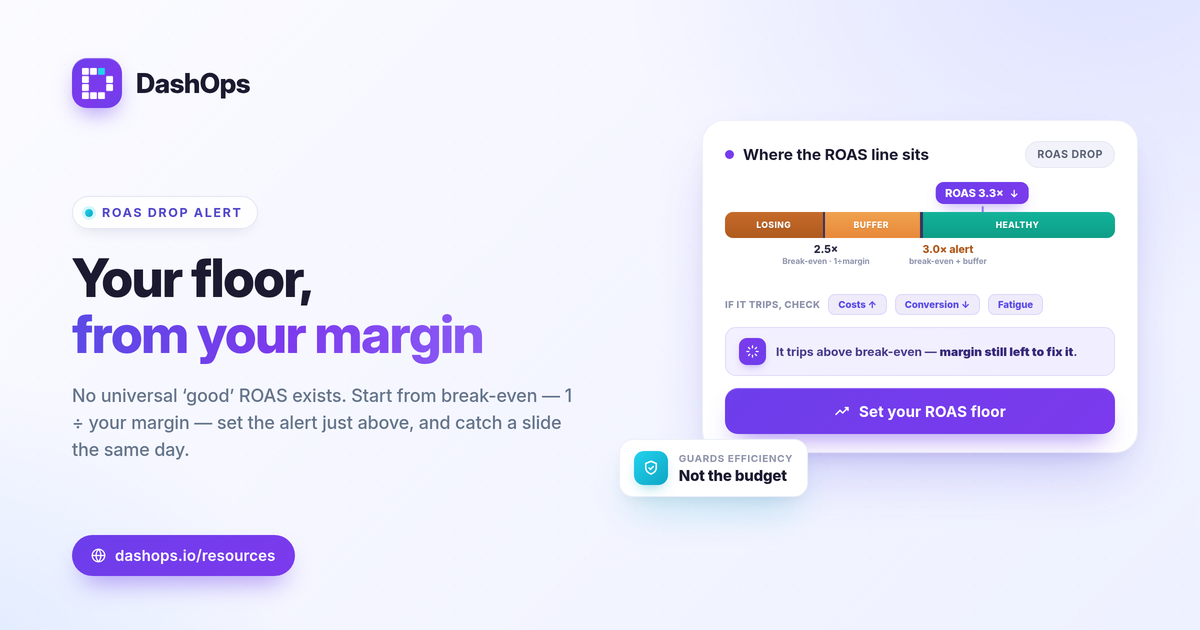
- Start from break-even. Break-even ROAS is 1 divided by your profit margin. A 40 percent margin means you break even at 2.5, so anything below that loses money on the ad.
- Add a buffer. Set the alert a little above break-even, not exactly on it. You want to hear about a slide while there is still margin to defend, not after the campaign is already underwater.
- Anchor to your target. If you run to a target ROAS, set the alert below that target by an amount that reflects normal day-to-day noise, so it fires on a real drop rather than ordinary fluctuation.
If you are still settling on the right figure, what is ROAS in Meta ads and calculate break-even ROAS for ecommerce walk through the math in plain terms.
Step 2: Choose the scope and the window
A threshold is only useful when it is pointed at the right slice of data over the right period.
- Account or campaign level. An account-wide alert catches the big picture. A campaign-level alert catches a single underperformer before it drags the average down. Many advertisers run both.
- The comparison window. ROAS over the last 7 days reacts faster but is noisier. A trailing 14 or 30 day view is steadier. Pick the window that matches how quickly you are willing to act.
- Account for attribution lag. Meta keeps attributing conversions for a few days after a click, so a very recent ROAS figure tends to read low and then rise as data fills in. A short buffer in your window or threshold stops the alert from firing on numbers that simply have not finished reporting.
Step 3: Pick where the alert lands
An ad performance drop notification only works if it reaches you where you already look. The channel matters as much as the rule.
- Slack or Discord for teams that live in chat and want the alert in front of the whole group the moment a threshold is crossed. Setup for each is covered in Facebook ads Slack alerts setup and Discord Facebook ad performance alerts.
- A scheduled email digest for solo advertisers, or when a client or manager who is not in your chat tools should also see how the numbers are moving.
- A live dashboard as the backstop, so when the alert fires you can open one place and see the full context behind the number.
Route the alert to the people who can act on it, and keep the recipient list short enough that it never becomes noise people learn to ignore.
Step 4: Tie the alert to an action
An alert is a prompt, not a fix. Decide in advance what you will check when it fires, so you respond instead of just acknowledging it.
- Confirm it is real. Open the dashboard and check whether the drop is a sustained trend or a single odd day. Attribution lag and weekend swings cause false alarms.
- Find where it came from. ROAS falls for a reason: rising costs, falling conversion rate, or a shift in who is seeing the ads. A demographic or placement breakdown often shows the source quickly.
- Check for fatigue. If the same audience has seen the ads many times, frequency may be climbing while results soften. Period-over-period trends and frequency as a KPI make that pattern visible.
- Decide the response. Adjust budget, refresh creative, or pause the weakest campaign. The alert bought you the time to choose calmly.
ROAS alerts versus spend alerts
These two answer different questions, and most advertisers want both running.
| Alert type | Fires when | Tells you |
|---|---|---|
| ROAS drop | Return falls below your threshold | The money is working less hard |
| Spend or pacing | Budget runs ahead or behind plan | You are spending too fast or too slow |
A ROAS alert protects efficiency. A spend alert protects the budget itself. Reading Facebook ad spend spike alerts alongside this helps you decide which combination fits how you manage.
Keep lead-gen in mind
ROAS needs a conversion value, which sales campaigns have and many lead-gen campaigns do not. If you run lead generation, the same alerting logic applies to cost per lead or cost per result instead. Cost per lead is spend divided by leads, so an alert that fires when cost per lead rises above your threshold serves the same early-warning purpose. The mechanics in this guide carry over: set the line from your own economics, pick a window, choose a channel, and tie it to an action.
DashOps reads your Meta KPIs across every connected ad account with period-over-period comparison built in, and sends threshold alerts to Slack and Discord so a ROAS decline reaches you the same day rather than at reporting time, with scheduled email digests to keep the wider picture in front of you. When the alert fires, the same dashboard shows the demographic, placement, and trend context behind it, and white-label client reports let you keep the people you answer to informed. See what each plan includes on the pricing page, and the help center covers connecting an account and configuring alerts.
Set your threshold from your own break-even, route the alert somewhere you actually look, and decide today what you will do the moment it fires.
Frequently asked questions
What ROAS threshold should trigger an alert?
How fast can a ROAS drop alert actually fire?
Should I alert on ROAS or on cost per result?
See it in your own dashboard
DashOps brings Meta Ads reporting, campaign management, and white-label client portals into one place. Pick the plan that fits how you run ads.