How to Set Up Facebook Ad Spend Spike Alerts Before Budgets Blow Up
The fastest way to stop a Facebook ad budget from blowing up is to find out the same day it starts, not at month-end. Facebook ad spend spike alerts do exactly that: they watch your daily spend or pacing against a threshold you set, and the moment spend jumps past it, they push a message to Slack, Discord, or email. That turns a nasty month-end surprise into a same-day notification you can act on in minutes. This guide covers how to decide what to alert on, where to route alerts, and how to set them up so they are useful instead of noisy.
Why spend spikes slip through
Runaway spend rarely announces itself. A budget edit gets fat-fingered, a campaign exits the learning phase and delivery accelerates, an automated rule scales something too hard, or a duplicated ad set quietly doubles your daily outlay. Each looks fine inside Ads Manager until you add up the week.
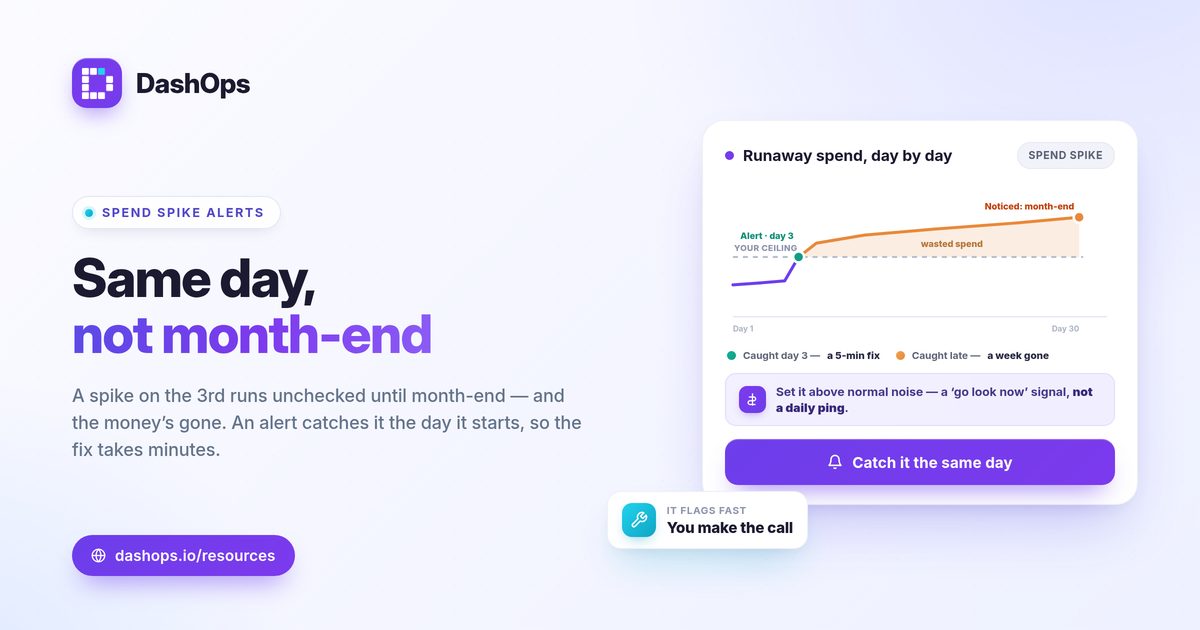
The problem is the reporting rhythm. Most advertisers and teams check performance on a weekly or monthly cadence, which means a spike on the 3rd can run unchecked until the 10th. By then the money is gone. Spend monitoring closes that gap by watching every day and only interrupting you when something is actually wrong.
Decide what a spike means for you
There is no universal “spend is too high” number, so the first step is defining the trigger against your own baseline. Look at your recent daily spend and your monthly budget, then pick thresholds that match reality.
- Absolute daily ceiling. The simplest spend threshold alert: notify me if any ad account spends more than a set amount in a day. Good for accounts with a steady budget.
- Pacing against budget. Watch month-to-date spend versus the budget you set for the period. If pacing projects an overshoot, that is a budget pacing alert, and it catches a slow drift a daily ceiling would miss.
- Relative jump. Notify me when today’s spend is well above the recent average. This adapts as budgets grow, so you are not constantly re-tuning the number.
Set the threshold a little above normal variation so you are not paged for ordinary day-to-day movement. The goal is a signal that means “go look now,” not a daily ping you learn to ignore.
Pick where the alert lands
An overspend notification is only useful if it reaches you before the damage compounds. Match the channel to how you actually work.
- Slack or Discord for teams that live in chat. The alert lands in the channel where the people who can act already are, so the spend monitoring conversation starts immediately.
- Email for solo advertisers, freelancers, or anyone who wants a record they can forward to a client.
- Both when one person owns the budget but a team needs visibility.
The point of routing Meta Ads budget alerts to a real-time channel is speed. A spike that hits Slack at 9am gets handled at 9:05. The same spike sitting in a dashboard nobody opened until Friday is a week of wasted spend.
A practical setup, step by step
You do not need a complex system. A workable spend spike alert setup comes down to a few decisions made once.
- Connect your ad accounts. Alerts can only watch spend they can see, so the account or accounts you care about need to be connected first.
- Set the threshold. Use one of the three trigger types above. Start with an absolute daily ceiling if you are unsure, since it is the easiest to reason about.
- Choose the channel. Paste your Slack or Discord webhook, or confirm the email address that should receive notifications.
- Send a test. Fire a test alert so you know the wiring works before you rely on it. A silent alert that never arrives is worse than no alert.
- Tune after a week. If you get paged for normal movement, raise the threshold. If a real spike slipped through, lower it. One round of tuning usually settles it.
What to do when an alert fires
The alert is the start of the response, not the end. When a spend spike notification lands, work from biggest lever to smallest.
- Open the account and confirm it is real. Sometimes a spike is a legitimate planned increase. The alert just made sure you knew.
- Find the source. Sort campaigns by spend for the day and look at what moved. Usually one campaign or ad set is responsible.
- Check the budget and the why. A jump often traces back to a budget change, a new duplicate, or a delivery acceleration after the learning phase. Frequency and CPM can tell you whether you are paying more for the same audience.
- Act. Pause, lower the budget, or let it ride if the spend is buying results. On Growth and Enterprise plans you can edit the campaign in the same place you got the alert, so the fix happens in minutes.
If a spike came with a jump in cost without a matching jump in results, that is the signal to slow down. Our guide to the Meta Ads KPIs that matter covers which numbers tell you whether spend is buying anything.
Where this fits alongside your reporting
Spike alerts are not a replacement for regular reporting, and they are not the same thing as a dashboard you check. They are the layer that watches the gap between those check-ins. Alerts catch the sharp break; the dashboard and your weekly or monthly review catch the slower trends and tell the fuller story. If you are weighing live monitoring against pulling numbers manually, the difference between Facebook Ads Manager and a reporting dashboard is a useful frame.
DashOps reads spend and 17 plus KPIs across all your Meta ad accounts in one dashboard, with a spend pacing view and Slack, Discord, and email alerts so a runaway budget reaches you the same day instead of at month-end. On Growth and Enterprise plans you can edit the campaign right there once an alert flags it. See what each plan includes on the pricing page, and the help center covers connecting accounts and wiring up alerts.
Set a threshold you trust, route it to where you already work, and a spend spike becomes a five-minute fix instead of a month-end shock.
Frequently asked questions
What counts as a spend spike worth alerting on?
Will spend spike alerts stop a campaign from overspending on their own?
How is a spend spike alert different from a budget pacing alert?
See it in your own dashboard
DashOps brings Meta Ads reporting, campaign management, and white-label client portals into one place. Pick the plan that fits how you run ads.