How to Calculate Break-Even ROAS for Your Store and Track It in a Dashboard
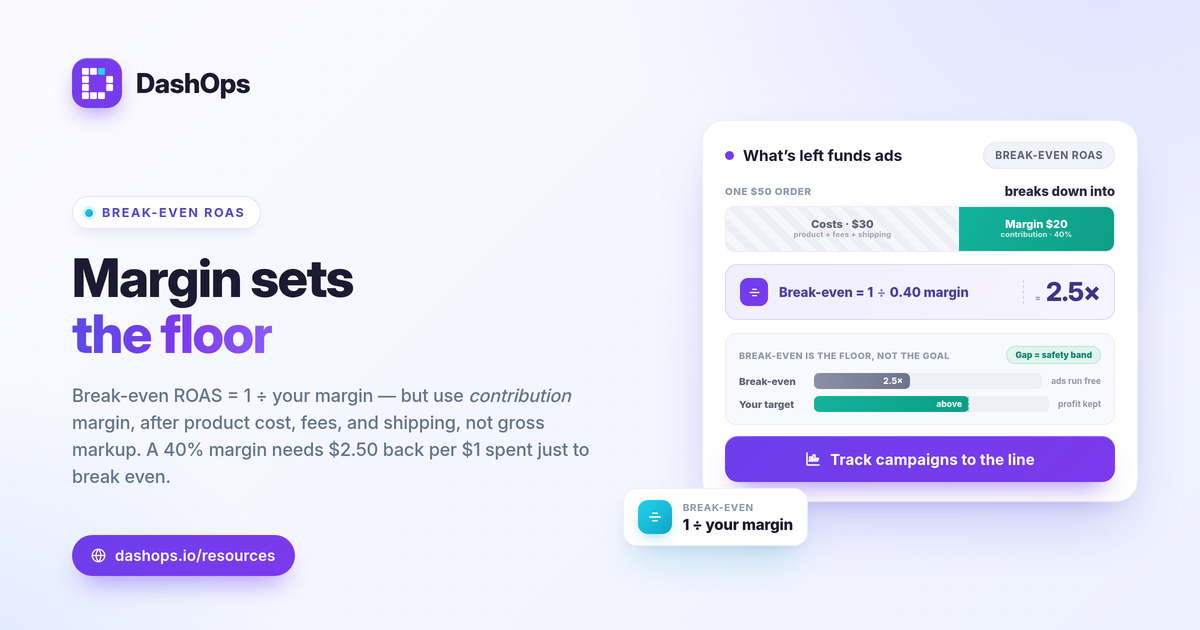
Break-even ROAS is the return at which your ad revenue exactly covers the cost of the product and the ad spend, so your profit on that spend is zero. The break-even ROAS calculation is simple: break-even ROAS = 1 / profit margin. If your contribution margin is 40 percent, your break-even ROAS is 1 / 0.40 = 2.5, which means every dollar of spend must bring back 2.50 dollars in sales just to stay even. Anything above that line is profit, anything below it is a loss. This guide walks through the break-even ROAS formula using your margin, shows how to set a target above it, and explains how to draw that line in a dashboard so profitable campaigns are obvious at a glance.
Start with your real profit margin
The break-even ROAS calculation is only as good as the margin you feed it. Use your contribution margin, not your gross markup, because the goal is to know what is actually left to pay for ads.
- Start from selling price. Take the average price a customer pays.
- Subtract cost of goods. What the product itself costs you to make or buy.
- Subtract variable costs per order. Payment processing fees, shipping you absorb, packaging, and per-order fulfillment.
- Divide what remains by the selling price. That decimal is your contribution margin.
For a store like demo brand Acme Apparel selling a shirt at 50 dollars with 30 dollars of combined product and variable cost, the margin is 20 / 50 = 0.40. That 0.40 is the number the ROAS margin calculation runs on.
Apply the break-even ROAS formula
Once you have the margin, the rest is one division.
- Break-even ROAS = 1 / profit margin. With a 0.40 margin, that is 1 / 0.40 = 2.5.
- A thinner margin needs a higher return. At a 0.25 margin, break-even ROAS is 1 / 0.25 = 4.0, so the same spend has to work much harder.
- A fatter margin lowers the bar. At a 0.60 margin, break-even ROAS is 1 / 0.60 = about 1.67.
This is why there is no single minimum ROAS to profit that applies to every store. The minimum is set by your own economics. Two brands running identical campaigns can have completely different break-even points purely because of margin.
Set a target ROAS above break-even
Break-even is the floor, not the goal. Hitting exactly break-even means you ran ads for free and kept nothing, so your target ROAS for e-commerce should sit above the break-even line with the profit you actually want baked in.
- Decide the profit you want to keep. If break-even is 2.5 and you want a healthy cushion, your target might sit comfortably above it.
- Account for costs the margin missed. Returns, discounts, and overhead all eat into real profit, so a target above break-even absorbs them.
- Treat the gap as your safety band. The distance between break-even ROAS and target ROAS is your room for the bad days, seasonality, and rising costs.
If you want to judge whether a target is realistic before committing budget, compare it against your own prior-period results rather than a universal number. Our post on what is a good ROAS for ecommerce facebook ads covers how to frame “good” against your goals instead of a benchmark.
Draw the break-even line in your dashboard
A number in a spreadsheet is easy to forget. A line on a chart is not. The point of putting break-even ROAS into a dashboard is that profitability stops being a calculation you redo every week and becomes something you see.
- Pin break-even as a reference point. Know the figure, for example 2.5, and read every campaign’s ROAS against it.
- Sort campaigns by ROAS. Campaigns above your break-even line are funding the business; campaigns below it are spending it down.
- Watch the period-over-period trend. A campaign drifting from above the line toward it is a warning before it ever turns into a loss.
- Separate the winners from the watch list. Anything below break-even either needs a fix or needs its budget moved to a campaign that clears the line.
DashOps reports Meta-native ROAS for each campaign with period-over-period comparison, so you can line every campaign up against your own break-even figure and see which ones clear it. ROAS is calculated the standard way, conversion value divided by spend, using the numbers Meta returns.
Read reported ROAS with the right caution
The ROAS your dashboard shows is the ROAS Meta can attribute, and that is not always the full picture. iOS privacy changes cause Meta to undercount conversions, which means reported ROAS can read lower than your store’s actual revenue. This matters for the break-even comparison.
- Use Meta-native ROAS to compare campaigns to each other. It is consistent across your campaigns, so relative ranking against the break-even line stays fair.
- Reconcile totals against your store. Check Meta’s reported revenue against your actual sales for the same window to understand the gap.
- Do not lower your break-even target to chase undercounted numbers. The margin math does not change because attribution shrank.
If ROAS is one of several metrics you watch, our guide to the Meta ads KPIs to track puts it alongside the others, and Facebook Ads Manager vs a reporting dashboard explains why a dedicated view makes a target line easier to hold to than scrolling raw columns.
A worked example end to end
Putting it together for demo store Globex Outdoor:
- Margin. Average order 80 dollars, combined cost 48 dollars, so margin is 32 / 80 = 0.40.
- Break-even ROAS. 1 / 0.40 = 2.5.
- Target ROAS. Set above 2.5 to keep real profit after returns and overhead.
- In the dashboard. Campaign A returns 3.1 and clears the line, Campaign B returns 2.1 and sits below it. Budget moves from B toward A, or B gets fixed.
That is the whole loop: margin sets break-even, break-even sets the line, and the dashboard tells you which campaigns are on the right side of it.
DashOps reads 17+ Meta KPIs, including ROAS, spend, and purchases, across your ad accounts in one dashboard with period-over-period comparison, so your break-even figure becomes a line you check rather than a sum you redo. See what each plan includes on the pricing page, and the help center covers connecting your ad account. For agencies showing clients where profit begins, white-label client reporting puts that same view under your own brand.
The practical takeaway: calculate break-even ROAS once from your true margin, then track every campaign against that line so a losing campaign shows itself before it drains the budget.
Frequently asked questions
What is the break-even ROAS formula?
Is break-even ROAS the same as target ROAS?
Why is my reported ROAS lower than my real sales?
See it in your own dashboard
DashOps brings Meta Ads reporting, campaign management, and white-label client portals into one place. Pick the plan that fits how you run ads.