Are Your Facebook Ads Costs Too High? How to Tell Using Industry Benchmarks
Whether your Facebook Ads costs are too high is not a question any single number can answer. A CPM or CPL only looks expensive once you compare it against your own goals, your profit margin, and your own prior performance. The question “are Facebook Ads costs too high” really breaks into three smaller checks: is my CPM high for my audience and season, is my CPC high relative to my click quality, and is my CPL high relative to what a lead is worth to me. This post walks through each metric, the formula behind it, and how to decide, honestly, whether you have a cost problem or a results problem.
Why a universal benchmark number will not save you
It is tempting to search for “the average CPM” or “the normal cost per lead” and compare your number to it. The problem is that real benchmarks vary widely by industry, objective, audience, geography, and season, which is exactly why one published figure rarely matches your situation. A lead-gen campaign for a niche local service and an e-commerce prospecting campaign in a competitive category can sit far apart and both be perfectly healthy.
So instead of chasing one universal number, benchmark against the thing you control and can actually verify: your own history. Period-over-period comparison is the honest way to benchmark yourself. If you want the broader picture on this approach, the guide on how to benchmark Meta Ads performance goes deeper.
Is my CPM too high?
CPM is the cost to reach 1,000 people: CPM = spend / impressions times 1,000. It is the metric most shaped by forces outside your creative, which is why “why is my CPM so high” is one of the most common questions advertisers ask.
These factors move CPM up:
- Auction demand. More advertisers bidding for the same audience raises the price for everyone.
- Season. High-demand windows like Q4 and major sale events push CPM up across the board.
- Audience size and saturation. A small or narrow audience runs out of fresh people quickly, and the auction charges more to keep reaching them.
- Frequency. When the same people see your ads again and again, frequency rises and efficiency usually falls.
To diagnose your own CPM, compare it to your prior period rather than to a stranger’s number. A CPM that climbed against your own recent weeks is a signal worth chasing. From there, use your demographic and placement breakdowns to find which segment moved. If one placement or age band is dragging the average, you have found something actionable. For the deeper dive, see why did my CPM jump.
Is my CPC too high?
CPC = spend / clicks. It rises when your CPM rises, but it also rises when fewer people click, so it folds two things together: the cost of reach and the appeal of your ad.
Because of that, never read CPC alone. Read it next to CTR (CTR = clicks / impressions). If CPC is up and CTR is steady, the cost increase is coming from the auction, not your creative. If CPC is up because CTR fell, the ad is resonating less and the fix is creative or audience, not bidding. A high CPC with a strong CTR can still be fine if those clicks convert. The relationship between these two metrics is covered in CPM vs CPC in Meta Ads.
Is my CPL too high?
Cost per lead = spend / leads. This is where advertisers most often panic over the wrong number, because a CPL means nothing without the value of a lead attached to it.
To judge your CPL honestly, hold it against:
- What a lead is worth. Your close rate times your average deal value tells you how much you can afford to pay for a lead and still profit.
- Lead quality, not just volume. A lower CPL that brings unqualified leads is more expensive than a higher CPL that closes. Track quality alongside cost.
- Your prior period. A CPL that crept up against your own history, with no rise in quality, is the real flag.
For e-commerce, the equivalent guardrail is break-even ROAS, which is 1 / profit margin. Any ROAS above that is profitable; below it, you are losing money regardless of how the raw number looks. The distinction between these outcome metrics is laid out in ROAS vs CPL vs CPA explained.
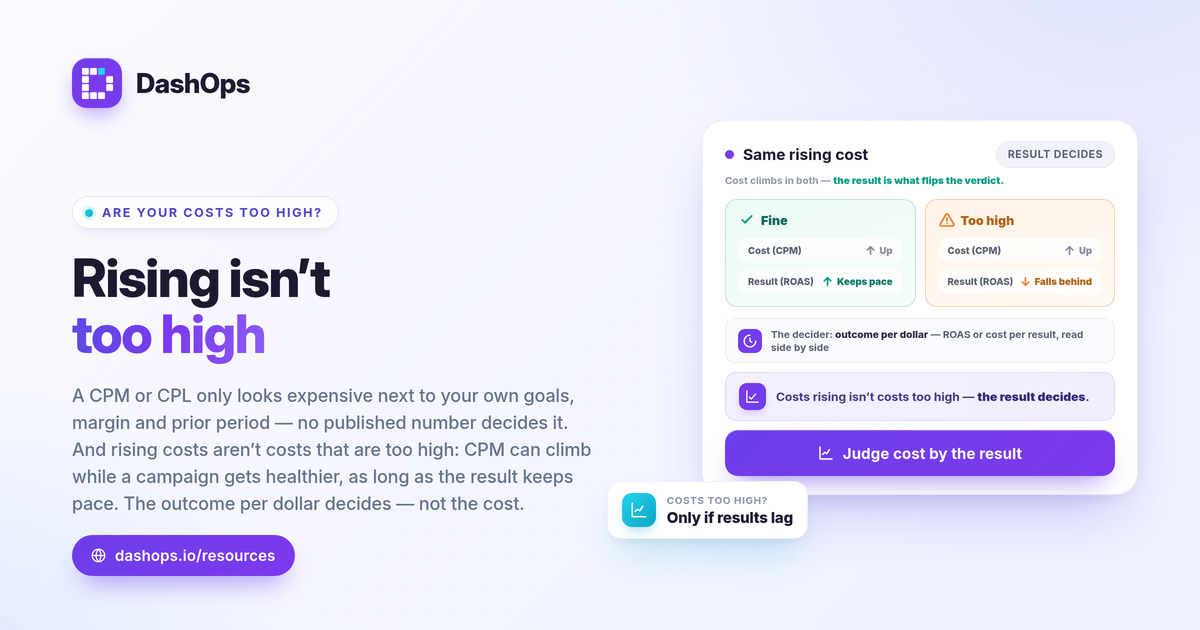
Costs rising is not the same as costs being too high
Here is the trap. CPM and CPC can rise while your campaign gets healthier, as long as the value those costs produce rises faster. The metric that decides whether you have a problem is the outcome per dollar: ROAS for sales, cost per result for lead gen.
- Rising CPM, steady or improving ROAS: usually fine. You are paying more to reach people, but the results are keeping pace.
- Rising CPM, falling ROAS or rising CPL: the genuine warning. Now the cost increase is not being earned back.
This is only visible side by side, which is the whole argument for comparing periods rather than staring at a single snapshot.
How to reduce Meta Ads cost once you have diagnosed it
If you have confirmed a real cost problem, the lever depends on which metric is off:
- High CPM from saturation or frequency: refresh creative, broaden or rotate the audience, and watch frequency as a KPI so you catch fatigue early. The piece on Facebook ad frequency and fatigue analysis covers this.
- High CPC from weak CTR: the issue is appeal. Test new hooks, formats, and offers, and check which placements and demographics actually click.
- High CPL with low quality: tighten targeting or the offer, and use your breakdowns to spot where spend is wasted.
Each of these decisions leans on the same foundation: knowing your own numbers, by segment, over time.
How DashOps helps you make this call
DashOps reads every Meta KPI you need for this diagnosis, spend, CPM, CPC, CTR, ROAS, cost per lead and frequency, across all your ad accounts in one dashboard, with period-over-period comparison built in so you are always measuring against your own history instead of a borrowed average. Demographic and placement breakdowns let you find exactly which segment is driving a cost up. See what each plan includes on the pricing page, and the help center covers connecting your ad accounts. For the metrics worth watching alongside cost, start with the Meta Ads KPIs to track.
The honest answer to “are my costs too high” comes from comparing this period to your last one against your own goals, not from any number you read somewhere else.
Frequently asked questions
Why is my Facebook CPM so high all of a sudden?
How do I know if my cost per lead is too high?
Are rising Facebook Ads costs always a problem?
See it in your own dashboard
DashOps brings Meta Ads reporting, campaign management, and white-label client portals into one place. Pick the plan that fits how you run ads.