Scheduled Email Digests vs Live Dashboard Links: Which Meta Ads Report Should You Send?
A scheduled email digest and a live dashboard link solve the same problem from opposite directions, so the right answer in the scheduled email digest vs dashboard link question is usually both, matched to the reader. A digest is pushed: it lands in an inbox on a set cadence with the headline numbers already summarized. A live link is pulled: the reader opens it whenever they want and sees current data. Busy stakeholders who just want to know if the money worked tend to prefer the digest. Hands-on clients who like to explore prefer the link. Below is when each one wins, and how to run them together as a single Meta Ads report delivery system.
What each method actually is
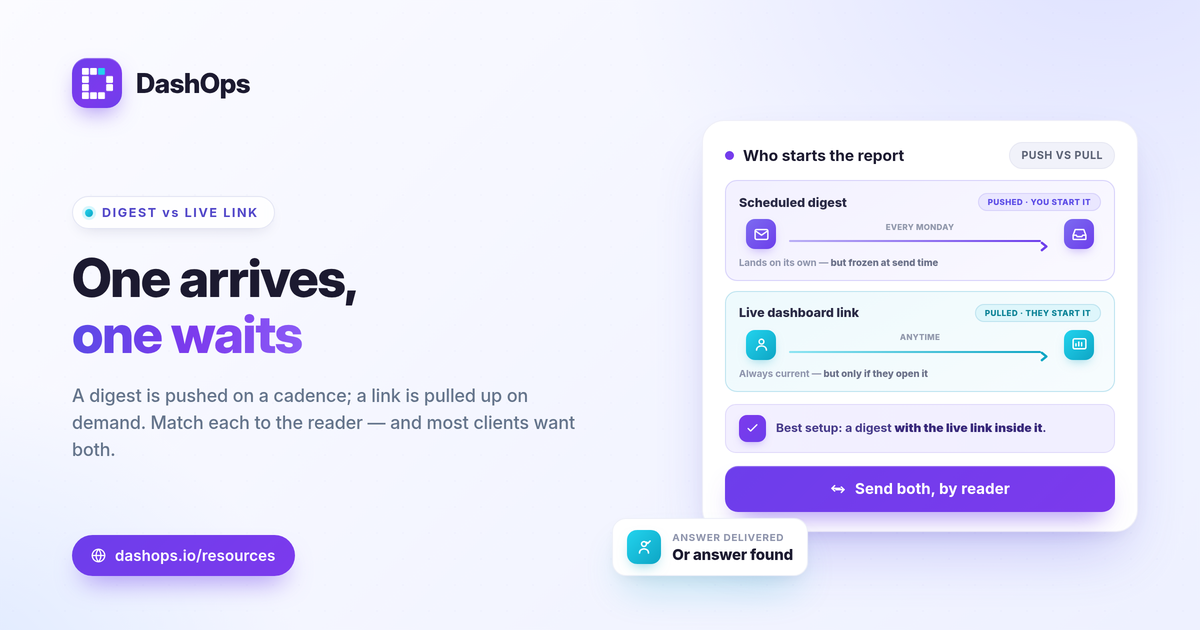
The two methods differ in one thing: who initiates the report.
- Scheduled email digest (pushed). An automated email goes out on a cadence you set, weekly or monthly, with the key KPIs and period-over-period change baked in. The reader does nothing. This is the core of most automated email reports.
- Live dashboard link (pulled). A read-only URL the reader opens on demand. The data is current at the moment they look, and they can change date ranges, scan breakdowns, and drill into campaigns themselves.
A digest is a snapshot frozen at send time. A link is a window that always shows the latest. That single distinction drives every trade-off that follows.
When a scheduled email digest wins
Choose the pushed digest when attention is the constraint, not curiosity.
- The reader is busy and passive. Owners and executives who want the result, not the tool, read an email but rarely log into a dashboard.
- Cadence matters. A standing Monday morning summary creates a rhythm. The report arrives whether or not anyone remembers to look.
- You want a paper trail. Each digest is a dated record of what the numbers were that week or month, useful for showing a trend over time.
- The story is simple. Spend, results, cost per result, and the change versus last period fit cleanly in an email. If the headline is the whole point, a digest delivers it.
The limit of a digest is that it is fixed. It cannot answer a follow-up question, and by the time someone reads a Monday email on Thursday, the live numbers have moved.
When a live dashboard link wins
Choose the pulled link when the reader wants to explore or check in between scheduled reports.
- The reader is hands-on. Some clients and in-house marketers want to slice by age and gender, compare placements, and look at top campaigns themselves.
- Questions come up off-cadence. A live link answers what is happening right now without you exporting anything or sending a one-off update.
- The data benefits from interaction. Demographic and placement breakdowns and trend charts are easier to understand when the reader can change the date range and follow their own thread.
- You manage many accounts. A standing link per client or a portal means people self-serve instead of queuing requests to you.
The limit of a link is that it is passive on the sender’s side. If no one opens it, no one sees the numbers, which is exactly the gap a digest fills.
Side by side
| Factor | Scheduled email digest | Live dashboard link |
|---|---|---|
| Who starts it | You, on a cadence (pushed) | The reader, on demand (pulled) |
| Data freshness | Snapshot at send time | Current when opened |
| Best reader | Busy, wants the headline | Hands-on, wants to explore |
| Interaction | None, read-only summary | Filters, breakdowns, drill-down |
| Record over time | Yes, dated emails | Live view, no automatic archive |
| Risk | Ignored or stale by the time read | Never opened |
How to use both, by reader
You do not have to pick one method for everyone. The strongest setup pairs them and assigns by client.
- Default to a digest, back it with a link. Send the weekly or monthly email so the headline always lands, and include a live link in that same email for anyone who wants to go deeper. The passive reader gets the summary; the curious reader gets the door.
- Match the cadence to the question. A weekly digest suits fast-moving spend; a monthly one suits a slower review. If you are unsure, see weekly vs monthly Meta Ads reports.
- Lead with the right KPIs. Whether pushed or pulled, the report should open with the metrics tied to the goal, ROAS and cost per purchase for e-commerce, cost per lead and lead volume for lead gen. Our guide to Meta Ads KPIs to track covers which to feature.
- Keep client access read-only. Give client users a simplified view so they see results without touching settings, which is the point of a client portal and white-label reporting.
How this connects to Ads Manager
Both methods exist because the native interface is not a reporting tool. Ads Manager is built for managing campaigns, not for delivering a clean recurring summary or a shareable read-only view. A digest or a link turns raw Meta numbers into something a stakeholder reads without logging in. If you want the full contrast, see Facebook Ads Manager vs a reporting dashboard.
One product note that matters for any delivery method: Meta only lets you download Instant Form leads directly from the Page for a limited window, about 90 days, after which leads must be retrieved through the API or a connected tool. A reporting layer that keeps reading those numbers protects you from that gap.
DashOps supports both methods from the same data. You can send scheduled email digests and white-label client reports on a cadence, and share public read-only links and a simplified client portal for the people who prefer to self-serve, all reading 17+ Meta KPIs with period-over-period comparison across your ad accounts. See what each plan includes on the pricing page, and the help center walks through setting up digests and share links.
Pick the digest for the reader who wants the answer delivered, the live link for the reader who wants to find it, and give most clients both.
Frequently asked questions
Should I send a scheduled email digest or a live dashboard link to clients?
Do automated email digests replace a live dashboard?
Can I white-label both the email digest and the dashboard link?
See it in your own dashboard
DashOps brings Meta Ads reporting, campaign management, and white-label client portals into one place. Pick the plan that fits how you run ads.