How Much Does Meta Ads Reporting Software Cost? A Per Ad Account Pricing Guide
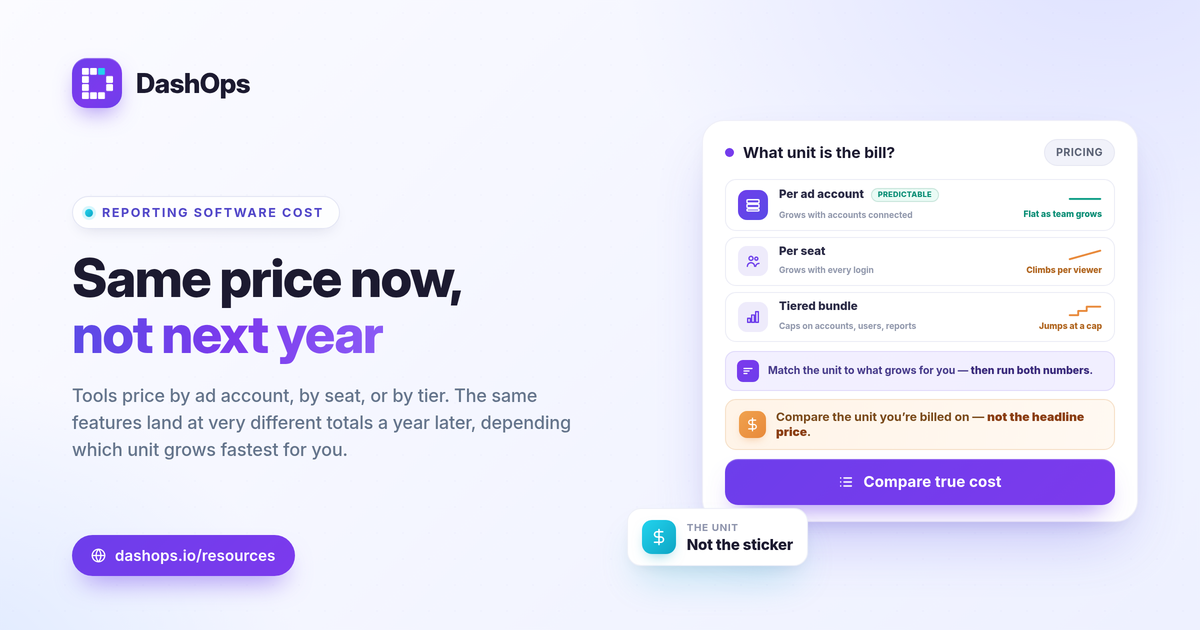
Meta Ads reporting software cost comes down to one question: what unit are you being charged for. Tools price in three main ways, by ad account, by seat, or by tiered feature bundle, and the same feature set can land at very different totals depending on which model a vendor uses and how your team is shaped. The right way to compare is not the headline number but the total you pay once your real ad accounts, viewers, and clients are added in. This guide breaks down each pricing model, shows where per ad account pricing wins, and gives you a way to estimate your true cost before you commit.
The three ways Meta Ads reporting tools price
Most Facebook Ads reporting tool pricing falls into one of three structures. Knowing which one you are looking at tells you how your bill will grow over time.
- Per ad account. You pay based on how many Meta ad accounts you connect. Viewers, teammates, and clients are usually unlimited or generous. Your cost scales with the number of accounts you report on.
- Per seat (per user). You pay for each person who logs in. Costs climb as your team grows or as you add client logins, even if those people only ever view a report.
- Tiered feature bundles. You pay for a plan tier that unlocks a set of features, often with caps on accounts, users, or reports baked in. The trap here is paying for a higher tier just to lift one limit.
Many tools blend these. A plan might be tiered for features and then charge per ad account on top, or include a few seats and bill extra beyond them. Read the fine print for what counts as a billable unit.
Why the unit of pricing matters more than the sticker price
Two tools can advertise a similar starting price and cost you wildly different amounts a year later. The driver is which unit grows fastest in your situation.
If you run a single brand with one ad account but several people who need to see results, per seat pricing multiplies fast while per ad account pricing stays flat. If you are an agency with many accounts and only a couple of staff, the math flips. The lesson is to map the pricing unit to the thing that grows in your business.
This is also why a feature comparison alone is misleading. The question is not only what does the cost of ad reporting software include, but how does that cost behave as you add the next account, the next teammate, or the next client portal.
How to compare true cost across models
Use the same inputs across every tool you are weighing. Estimate cost like this:
| Model | What you multiply | Best when |
|---|---|---|
| Per ad account | Number of connected accounts | Many viewers, fewer accounts |
| Per seat | Number of logins | Few viewers, many accounts |
| Tiered | Plan tier that fits your caps | Needs sit cleanly inside one tier |
Then write down four numbers for your own business: how many Meta ad accounts you report on, how many internal people need access, how many clients need read-only views, and how often that count changes. Run each tool’s model against those numbers. The cheapest sticker price rarely stays cheapest once your real counts are applied.
Where per ad account pricing wins
Per ad account pricing tends to be the most predictable model for the people who do the most reporting. It wins clearly in a few common cases.
- Growing teams. Adding a strategist, an analyst, or an account manager does not change your bill, because you are billed on accounts, not logins.
- Client reporting at scale. Read-only client users and public share links do not add per seat cost, so onboarding a new client is free on the access side. If you send white-label reports, see white-label client reporting for how that fits.
- Stable account counts. If you manage a known set of ad accounts, your cost is easy to forecast month to month. There are no surprise charges when a teammate logs in for the first time.
- Consolidation. Pulling several ad accounts into one view is the whole point, and per account pricing keeps that affordable. See managing multiple Meta ad accounts for how a single dashboard changes the workflow.
Per seat pricing can still be cheaper if you genuinely have very few viewers and a large number of accounts, so always run both numbers.
Questions to ask before you pay
A Meta Ads dashboard price is only fair if it matches the work you actually do. Before you buy, get clear answers to these.
- What exactly is a billable unit? Confirm whether you pay per account, per seat, per report, or a mix.
- Are client and read-only viewers free? If clients count as seats, client reporting gets expensive fast.
- What raises the bill? Find out which action moves you to a higher tier or adds a charge.
- Is white-label included or an add-on? Custom domains and branded reports are sometimes gated behind the top tier.
- Does it cover the KPIs you report on? A cheap tool that misses metrics you need is not cheap. Review Meta Ads KPIs to track so you know your must-haves.
It also helps to know what you are replacing. If you currently export from Ads Manager by hand, compare the time cost against a dashboard in Facebook Ads Manager vs a reporting dashboard.
How DashOps prices
DashOps uses per ad account pricing, so your cost scales with the Meta ad accounts you connect rather than the number of people who log in. Team members and read-only client users do not add per seat charges, which keeps client reporting and internal sharing predictable as you grow. Starter is view-only reporting, while Growth and Enterprise add the full Meta module including campaign create and edit, with white-label Lite on Growth and white-label Full with custom domains on Enterprise. Because the right total depends on your account count and the tier you need, the pricing page shows what each plan includes, and the help center walks through connecting accounts and setup.
The practical takeaway: do not compare sticker prices, compare what each tool charges you once your real ad accounts, teammates, and clients are added in.
Frequently asked questions
What does Meta Ads reporting software usually cost per ad account?
Is per ad account pricing cheaper than per seat pricing?
Why do reporting tools charge by ad account instead of by report?
See it in your own dashboard
DashOps brings Meta Ads reporting, campaign management, and white-label client portals into one place. Pick the plan that fits how you run ads.