How to Calculate CPC for Facebook Ads (With Formula and Benchmarks)
Cost per click (CPC) for Facebook ads is total ad spend divided by the number of clicks: CPC = spend / clicks. If you spent 600 and got 500 clicks, your CPC is 1.20. That single number tells you what each click into your funnel costs, which is the first step in working out whether your traffic is affordable. This guide covers the exact cost per click formula, how to read the two different CPC numbers Meta reports, how to judge a good CPC Facebook ads result against your own goals rather than a universal benchmark, and how to track the trend over time so a rising cost does not catch you off guard.
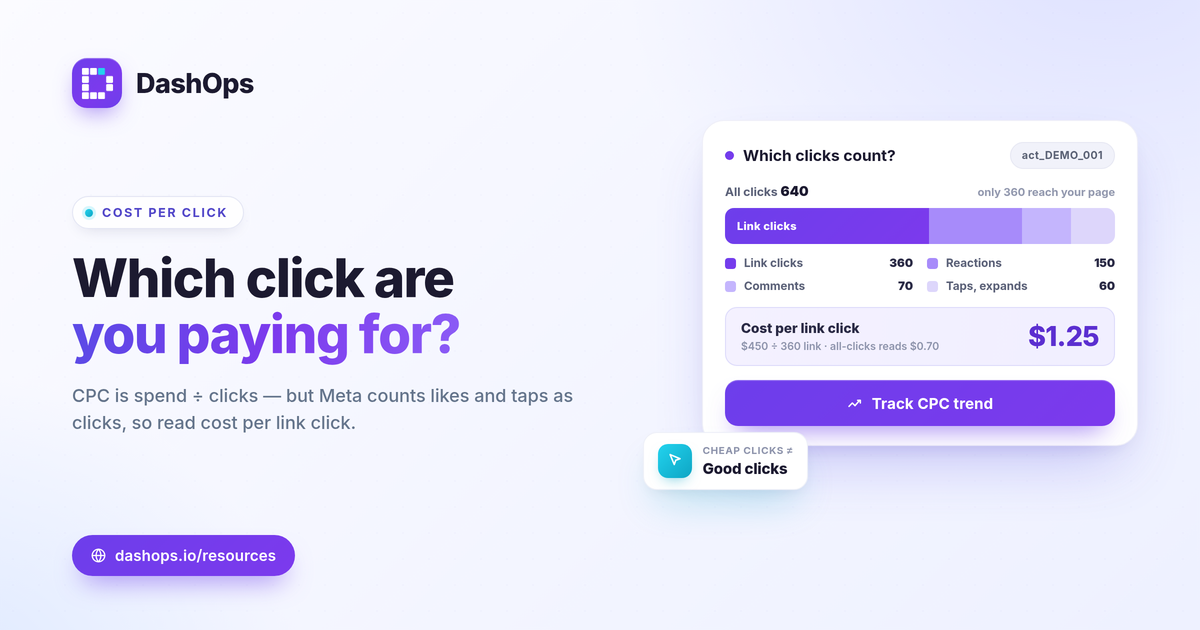
The cost per click formula
The cost per click formula is straightforward:
- CPC = spend / clicks
That is the whole calculation. Spend is the amount Meta charged for the ad, ad set, or campaign over the period you are looking at. Clicks is the number of clicks counted in that same period. Divide one by the other and you have your average cost per click for that slice of the account.
A worked example: an ad account, say act_DEMO_001, spends 450 on a campaign that records 360 clicks. CPC = 450 / 360 = 1.25. Each click cost 1.25 on average. Change either input and the result moves: spend more for the same clicks and CPC rises; earn more clicks for the same spend and CPC falls.
CPC sits in the same family as the other per-unit cost metrics, so it helps to keep the formulas side by side:
| Metric | Formula |
|---|---|
| CPC (cost per click) | spend / clicks |
| CPM (cost per 1,000 impressions) | spend / impressions times 1,000 |
| CTR (click-through rate) | clicks / impressions |
| Cost per lead | spend / leads |
Notice that CPC is mathematically linked to CPM and CTR. In fact CPC can be rewritten as CPM divided by CTR (then divided by 1,000). That relationship is the key to lowering cost per click, which we will come back to.
All clicks vs link clicks: read the right number
Meta reports two CPC figures, and mixing them up is the most common reason a CPC looks wrong.
- CPC (all). Counts every click on the ad: link clicks plus likes, comments, shares, profile taps, and image expands. This number is usually lower because it includes engagement that never leaves Facebook.
- Cost per link click. Counts only clicks that go to your destination, such as your landing page or lead form. This is the number most advertisers actually care about, because it reflects the cost of getting someone toward your offer.
Before you calculate or compare anything, confirm which column you are reading. A CPC that looks great might just be the all-clicks version inflated by engagement. For a closely related distinction, see link clicks vs landing page views, since not everyone who clicks your link actually loads the page.
What is a good CPC for Facebook ads?
There is no single average CPC Meta ads number that applies to your account, and any source that quotes one as gospel is flattening a lot of variation. CPC depends on your industry, your audience, your placements, your bidding, the season, and how competitive your auction is. A narrow, high-intent audience will almost always cost more per click than a broad consumer campaign, and neither is wrong.
So instead of chasing a universal figure, judge a good CPC Facebook ads result against three of your own reference points:
- Your goal economics. Work backward from what a customer is worth. If you can afford a certain cost per lead or cost per purchase and you know roughly how many clicks it takes to get one, you can derive the CPC your math allows. A click cost is only good or bad relative to what that click eventually earns.
- Your own prior periods. Your last 30 days is the most honest benchmark you have. A period-over-period comparison tells you whether CPC is climbing, holding, or falling against how this exact account behaved before.
- Your other metrics. A low CPC paired with a weak conversion rate is not a win. Always read CPC next to cost per result so a cheap click that never converts does not flatter the report.
If you want published ranges to sit alongside your own data, our CPC benchmark guide and the broader how to benchmark Meta ads performance post cover how to use external numbers without over-trusting them.
How to lower cost per click
Because CPC is CPM divided by CTR, you have two levers. Lower what you pay for impressions, or earn more clicks from the impressions you already buy.
- Improve CTR. A more relevant creative, a sharper hook, or a tighter audience-to-offer match means more clicks per impression, which pulls CPC down without changing spend. CTR is the lever you control most directly through creative and targeting.
- Manage CPM. Rising CPM pushes CPC up even when your CTR holds. Broad seasonal demand, audience overlap, and high frequency all inflate CPM. If you see CPC climbing, check whether CPM moved first.
- Watch frequency and fatigue. When the same people see an ad too many times, CTR tends to drop and CPC tends to rise. Frequency is a reported KPI you can track, and a demographic or placement breakdown often shows which segment is driving the cost up.
Track CPC as a trend, not a snapshot
A CPC pulled once is a number. CPC watched over time is a signal. A single high reading might be noise; three rising weeks in a row is a pattern worth acting on. Pair the trend with a breakdown so you can see whether the increase is account-wide or concentrated in one placement, age group, or campaign.
This is exactly the kind of metric that benefits from being read in one consistent place instead of re-pulled from Ads Manager every week. DashOps shows CPC alongside the other core Meta KPIs with period-over-period comparison and trend charts built in, plus demographic and placement breakdowns so you can see where a rising click cost is coming from. See what each plan includes on the pricing page, and the help center walks through connecting an ad account. For the wider metric set, the Meta ads KPIs to track post is a good companion, and if you are weighing native reporting against a dashboard, Ads Manager vs a reporting dashboard lays out the difference.
The practical takeaway: calculate CPC with spend divided by clicks, confirm you are reading link clicks, and judge the result against your own goals and prior periods rather than a borrowed average.
Frequently asked questions
What is the formula to calculate CPC for Facebook ads?
What counts as a click in Facebook CPC?
Is a lower CPC always better for Facebook ads?
See it in your own dashboard
DashOps brings Meta Ads reporting, campaign management, and white-label client portals into one place. Pick the plan that fits how you run ads.