Facebook Lead Ads Reporting for Real Estate: Track Cost Per Lead by Listing and Campaign
A useful real estate lead report answers two questions: how much each lead costs, and which listings or campaigns produce the leads worth following up. Facebook lead ads reporting for real estate works best when your account is structured so spend and leads line up per listing and per offer, then read together as cost per lead. Below is how to set that up, how to keep buyer and seller leads separate, and how to export Instant Forms leads before Meta’s retention window closes.
Structure the account so cost per lead is readable
Cost per lead is a simple formula: cost per lead = spend / leads. The hard part is not the math, it is being able to read spend and leads at the level you care about. If everything runs in one campaign, you only ever see a blended number.
- One listing or listing group per campaign or ad set. A waterfront condo building and a starter-home neighborhood attract different people at different costs. Keep them separate so each carries its own cost per lead.
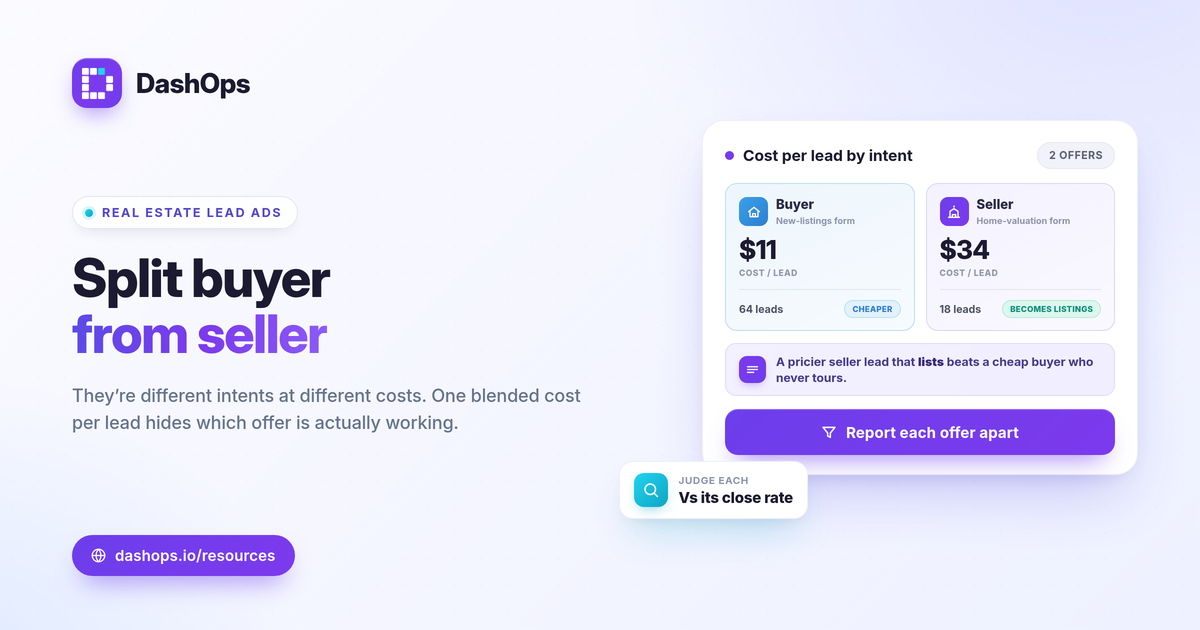
- Separate buyer and seller offers. A home valuation offer and a new-listings offer are different intents. Splitting them is the only way to compare real estate cost per lead Facebook returns for each.
- Consistent naming. Name campaigns so you can tell at a glance which listing, area, or offer they serve. Clean names make every later report faster to read.
Once the structure is in place, a real estate Meta ads dashboard can show cost per lead per campaign without you exporting and dividing by hand each week.
Read cost per lead by listing and by campaign
With spend and leads sitting at the campaign or ad set level, the comparison becomes direct.
- Cost per lead per listing. Which properties or areas bring leads cheaply, and which are expensive relative to the price point.
- Lead volume per campaign. A low cost per lead on a campaign producing two leads a week may matter less than a slightly higher cost on one producing twenty.
- Period-over-period movement. A single week’s cost per lead means little on its own. Comparing it to the prior period shows whether a listing is getting cheaper or more expensive to advertise as interest cools.
Frequency belongs in this view too. Real estate audiences in a single area are small, so the same people see your ads repeatedly. When frequency climbs and cost per lead drifts up at the same time, that is a fatigue signal worth acting on. A demographic breakdown by age and gender and a placement breakdown help you see whether the right buyers or sellers are even being reached.
Judge whether a cost per lead is good
Resist the urge to chase a universal number. What counts as a good real estate cost per lead depends on your market, your price point, and how many leads convert to listings or closings. A higher cost per lead on seller inquiries can still be excellent if those leads become listings, while cheap buyer leads that never tour a home are not a bargain.
Judge each campaign against three things: your own commission math and what a closed deal is worth, your prior-period cost per lead for the same offer, and the lead-to-appointment rate you see downstream. If you want to think this through more carefully, ROAS vs CPL vs CPA explained covers which efficiency metric fits a lead-gen goal, and the Meta ads KPIs to track post walks through the rest of the numbers that belong on a lead report.
Export buyer and seller leads from Instant Forms
Reporting tells you what a lead costs. The leads themselves still have to reach whoever follows up, fast. This is where real estate teams lose value if they are not careful.
- Use distinct Instant Forms per intent. A buyer form and a seller form should ask different questions and trigger different follow-up. Distinct forms also keep your real estate lead reporting cleanly split.
- Export to CSV or Excel. Pull leads into the format your team or CRM uses so agents can call quickly while interest is warm.
- Mind the retention window. Meta only lets you download Instant Form leads directly from the Page for a limited window, about 90 days, after which leads must be retrieved through the API or a connected tool. A new inquiry left unexported past that window can simply vanish from the Page download.
Because speed-to-lead matters in real estate, exporting on a regular schedule, or connecting a tool that pulls leads automatically, keeps a hot seller inquiry from sitting in a form you forgot to download.
Keep multiple ad accounts and listings in one view
Agents and small teams often run several ad accounts: one per brokerage, per team, or per major listing budget. Switching between them in Ads Manager makes cost per lead comparison slow and error-prone. Pulling every account into a single dashboard lets you read cost per lead across listings and offers in one place, then hand a clean summary to a broker or a seller. If you report to sellers directly, white-label client reporting shows how to present results under your own brand, and Facebook Ads Manager vs a reporting dashboard explains why a dedicated view beats the raw Ads Manager screens for recurring reports.
How DashOps fits
DashOps reads spend, leads, cost per lead, frequency, and the rest of your Meta KPIs across every connected ad account in one dashboard, with period-over-period comparison and age, gender, and placement breakdowns built in. It captures Instant Form leads and exports them to CSV or Excel, and it produces PDF or white-label reports you can share with sellers or a broker. See what each plan includes on the pricing page, and the help center covers connecting your ad accounts and forms.
The practical takeaway: structure buyer and seller offers as separate campaigns, judge each cost per lead against your own commission math and prior period, and export Instant Form leads on a schedule so none are lost to the 90-day window.
Frequently asked questions
How do I track cost per lead by listing in Facebook lead ads reporting for real estate?
How do I separate buyer leads from seller leads in my reports?
Why do my Instant Form leads disappear from the Facebook Page after a while?
See it in your own dashboard
DashOps brings Meta Ads reporting, campaign management, and white-label client portals into one place. Pick the plan that fits how you run ads.