What Is a Good CPM for Facebook Ads? Benchmarks Explained
A good CPM for Facebook ads is the one that still lets you hit your cost per result and ROAS targets, not a single number you can copy from a chart. CPM, the cost to reach one thousand people, swings with your audience, placements, objective, creative, and the season, so there is no universal “good” figure that holds across every account. The useful question is whether your CPM is trending in the right direction for your own goals and margins. This guide gives you the CPM formula, a sane way to set your own benchmark range, the factors that move CPM, and how to read all of it through your cost KPIs.
The CPM formula for Meta ads
CPM means cost per mille, or cost per one thousand impressions. The formula is simple:
CPM = spend / impressions times 1000
If you spent 400 and Meta served 200,000 impressions, your CPM is 400 / 200,000 times 1000, which equals 2. That is what you paid to put your ad in front of one thousand sets of eyes.
CPM measures the cost of delivery, not the cost of a result. It sits upstream of every other cost metric. A second formula completes the early picture:
- CPC = spend / clicks, the cost of getting someone to click.
- CPM = spend / impressions times 1000, the cost of getting the impression in the first place.
A low CPM does not guarantee cheap results, and a high CPM is not automatically bad. CPM only tells you how expensive the auction was. What you got for that money shows up in CTR, cost per lead, cost per purchase, and ROAS.
What counts as a good or average CPM
There is no honest single number for average CPM on Facebook ads, because CPM depends on who you target, where your ad shows, and when. Anyone quoting one universal figure is hiding that variation. Instead, build your own benchmark using three reference points.
- Your own history. Pull CPM for the last several months and look at the trend. Your prior periods are the fairest comparison you have, because they hold your audience and offer roughly constant.
- Across your campaigns. Compare CPM between ad sets in the same account. A prospecting campaign aimed at a broad cold audience usually carries a different CPM than a tight retargeting pool, and that gap is normal.
- Against your downstream economics. A CPM is only “good” if the impressions it buys convert profitably. Trace CPM through to cost per result and ROAS before you call it high or low.
To judge whether a CPM is acceptable, work backward from your margin. If you know your target cost per purchase or cost per lead, you can see how much delivery cost your funnel can absorb. The same CPM that sinks a thin-margin product can be perfectly fine for a high-margin one. For a fuller picture of how the cost metrics fit together, see Meta ads KPIs to track.
Factors that affect CPM
CPM moves because the cost of the auction moves. The main drivers:
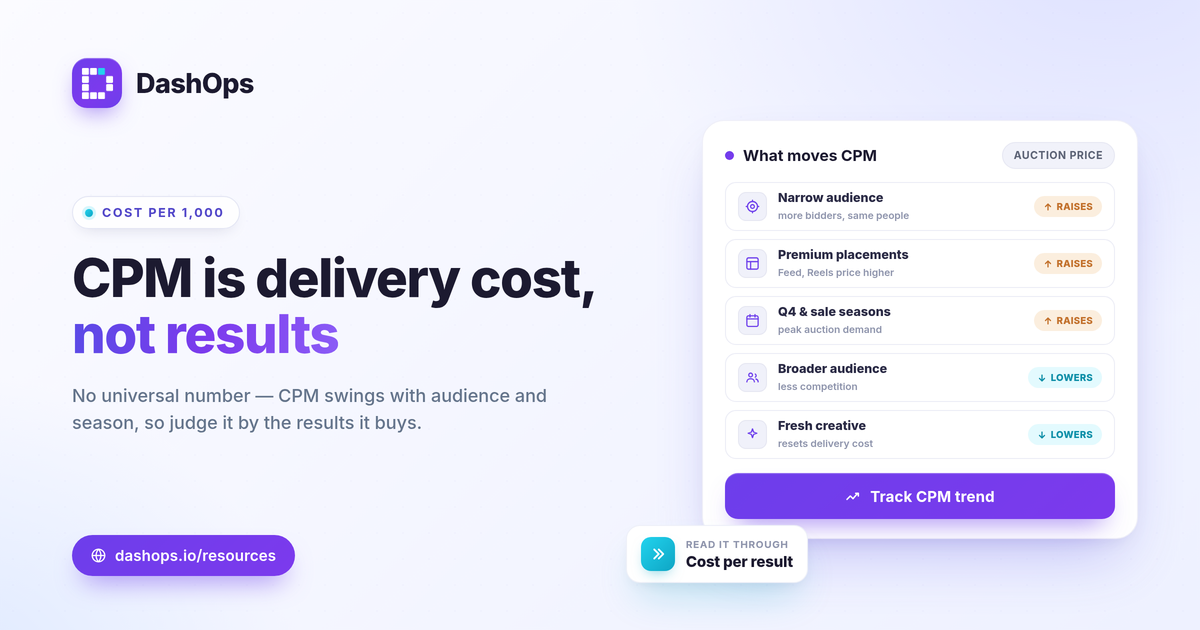
- Audience size and competition. Narrow, high-demand audiences cost more to reach because more advertisers are bidding for the same people. Broad audiences often carry a lower CPM.
- Placement. Feed, Stories, Reels, and Audience Network placements each price differently. A placement breakdown shows which surfaces are pulling your blended CPM up or down.
- Objective and optimization. Optimizing for a purchase or a lead tells Meta to find higher-intent people, which generally costs more per thousand than optimizing for reach or traffic.
- Seasonality. Auction prices climb during high-demand windows like Q4 and major sales events, then ease afterward. A CPM jump in late November is usually the calendar, not your account.
- Creative relevance and frequency. As a creative tires and frequency climbs, Meta has to work harder to deliver it, which can lift CPM. Rising frequency next to a rising CPM is a classic fatigue signal.
- Geography and language. Reaching audiences in more competitive markets costs more per thousand than reaching less contested ones.
Because so many forces push on CPM at once, a single number out of context tells you almost nothing. You need to see it next to frequency, reach, and your results over time. If your costs are climbing, why are my Facebook ads costs rising walks through the diagnosis in more depth.
How to lower CPM on Facebook ads
You rarely control CPM directly, but you can influence the conditions that set it.
- Refresh creative before it fatigues. Watch frequency. When it climbs and CPM follows, new creative often resets delivery cost.
- Test broader audiences. Opening up a narrow audience can reduce competition for the same impressions and bring CPM down.
- Review placements. If one expensive placement is dragging up your blended CPM without delivering results, the breakdown will show it.
- Avoid over-restricting delivery. Stacking many narrow conditions on an audience shrinks the pool and can raise the price to reach it.
- Mind the calendar. Plan around predictable high-cost windows rather than reacting to them as if something broke.
Every one of these moves should be judged on results, not on CPM alone. A slightly higher CPM that reaches better-fitting people and lowers your cost per result is the better outcome.
Reading CPM through your cost KPIs
CPM is most useful when you stop looking at it alone and read it as part of a chain: CPM feeds CPC, CPC feeds cost per result, and cost per result feeds ROAS. A move in CPM that does not change your downstream costs may not be worth acting on. A move that drags cost per purchase up with it is the one to chase.
This is where a reporting view earns its keep. DashOps reads CPM, CPC, CPM trends, frequency, reach, and your cost-per-result metrics across every connected ad account in one dashboard, with period-over-period comparison built in so a CPM change shows up next to what it did to your results. Demographic and placement breakdowns help you see which audiences and surfaces are setting your delivery cost. See what each plan includes on the pricing page, and the help center covers connecting your accounts. For how CPM relates to the click-cost metric, CPM vs CPC in Meta ads is a useful companion read.
The practical takeaway: stop hunting for a magic CPM number and start tracking your own CPM trend against the cost per result it produces.
Frequently asked questions
What is a good CPM for Facebook ads?
How is CPM calculated for Meta ads?
Why did my CPM suddenly jump?
See it in your own dashboard
DashOps brings Meta Ads reporting, campaign management, and white-label client portals into one place. Pick the plan that fits how you run ads.