What Is a Good Conversion Rate for Facebook Ads?
A good conversion rate for Facebook ads is one that hits your cost target and beats your own prior period, not a single universal number you can copy from a chart. Conversion rate measures how often the people who click or see your ad take the action you care about, whether that is a purchase or a lead. The formula is simple: conversions divided by the entry action, usually clicks. What counts as “good” depends on your offer, price point, margin, and audience, so the only honest Facebook ads conversion rate benchmark is the trend in your own account over time.
What conversion rate actually measures
Conversion rate tells you how efficiently attention turns into outcomes. Someone clicks or views your ad, lands somewhere, and either does the thing you want or does not. The rate is the share who do.
The conversion rate formula is:
- Conversion rate = conversions / clicks, shown as a percentage.
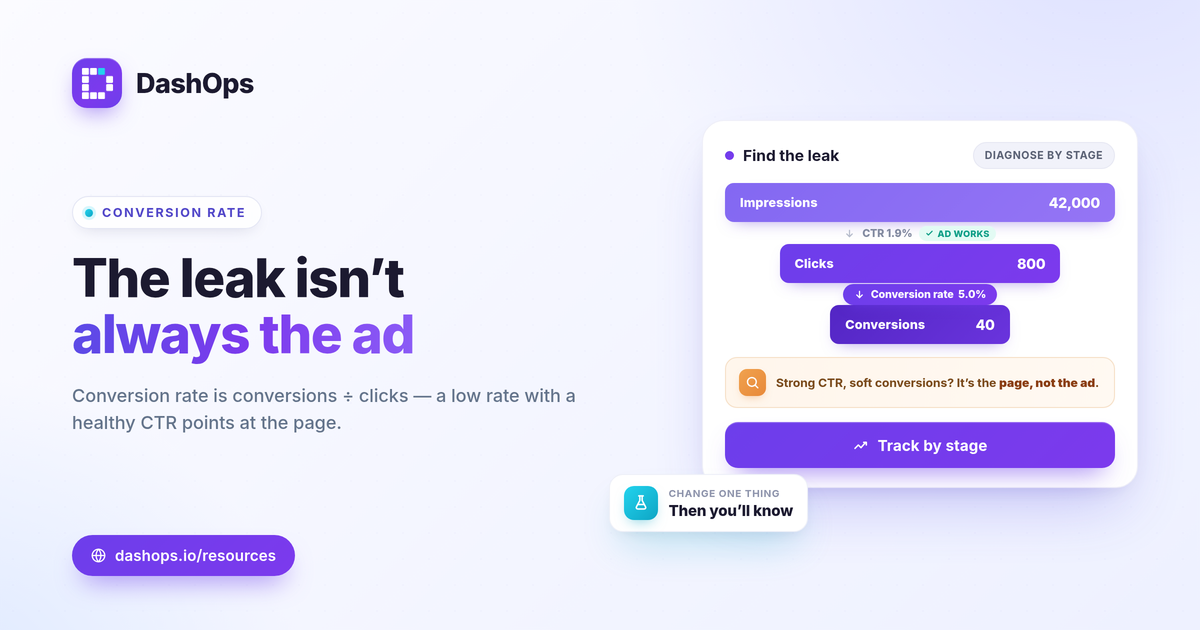
So 40 leads from 800 link clicks is 40 / 800, which is 5 percent. You can also measure conversions against landing page views or against people reached, depending on where you want to start counting. The key is consistency. Pick one definition of the entry action and one definition of the conversion, then hold both steady so the number stays comparable month over month.
This is different from cost per result. Conversion rate is a ratio of actions to actions. Cost per result divides spend by outcomes. Both matter, and they answer different questions.
What a good conversion rate for Facebook ads really means
There is no average conversion rate Meta ads number that applies to every account, and chasing one will mislead you. A high-ticket service that closes a few valuable leads can run a lower conversion rate than a low-price impulse product and still be far more profitable. Judge your rate against three things instead.
- Your goal and margin. A conversion only counts as good if the cost behind it leaves you profit. Tie the rate back to break-even, where break-even ROAS = 1 / profit margin for sales, or to your target cost per lead for lead gen.
- Your own prior period. The most useful benchmark is last month and last quarter in the same account. Period-over-period comparison shows whether you are improving or sliding, which a borrowed industry figure never can.
- Like-for-like segments. Compare similar audiences, placements, and offers. A cold prospecting campaign and a warm retargeting campaign will convert differently, and averaging them together hides both.
If you want context for how to set targets at all, how to benchmark Meta ads performance walks through judging your numbers without leaning on a single magic figure.
Where conversions show up in DashOps
DashOps uses adaptive KPIs, which means the dashboard shows the conversion metric that matches what your account is optimizing for. You do not have to dig for it.
- E-commerce accounts surface purchases, purchase value, ROAS, and cost per purchase, so you can read sales efficiency directly.
- Lead-gen accounts surface leads, cost per lead, and lead volume, so the conversion story is framed around pipeline rather than revenue.
Because both purchases and leads sit beside spend, clicks, and CTR in the same view, you can calculate and sanity-check conversion rate without exporting anything. If you want the full list of metrics that pair with conversion rate, Meta ads KPIs to track covers the 17-plus KPIs DashOps reads from Meta.
Why your conversion rate may look worse than reality
Two things commonly drag the reported number down, and neither means your ads stopped working.
- Attribution windows. Meta credits conversions inside the click and view windows you choose. Shorten the window and the count drops, even if the same sales happened. Keep your attribution setting consistent across reports so the rate is comparable.
- iOS and privacy limits. Since Apple’s tracking prompt, some conversions go unmeasured, which causes Meta to undercount. The effect is real and it pushes reported conversion rate below true performance. Treat the platform number as directional, and reconcile against your store or CRM totals.
When the gap between Meta-reported conversions and your real sales matters for a report, why are Facebook ad conversions lower than sales explains how to frame it for a client or stakeholder.
How to improve ad conversion rate
To improve ad conversion rate, find the weakest link in the chain rather than tweaking everything at once.
- Diagnose by stage. A strong CTR with weak conversions usually points at the landing page or offer, not the creative. Weak CTR points back at the ad. Match the fix to the leak.
- Tighten message match. The page should deliver exactly what the ad promised, with one clear action and fast load.
- Read your breakdowns. Demographic and placement breakdowns show which ages, genders, and placements convert better. Shift budget toward the segments that work and trim the ones that do not.
- Watch frequency. Rising frequency with falling conversions is a fatigue signal. Tracking frequency as a KPI over time helps you refresh creative before the rate slides.
Small, isolated changes also make cause and effect readable. If you change the offer, the audience, and the page in the same week, you will not know which one moved the rate.
DashOps brings spend, clicks, conversions, and the breakdowns behind them into one dashboard with period-over-period comparison, so your conversion rate is something you can read and trust rather than reconstruct from a spreadsheet. You can see what each plan includes on the pricing page, and the help center covers connecting your ad accounts and reading the KPIs. For accounts that report to clients, the same numbers flow into white-label exports as covered in white-label client reporting.
The practical takeaway: stop hunting for a universal good conversion rate and start tracking your own, against your margin and your last period, where it can actually guide a decision.
Frequently asked questions
What is the conversion rate formula for Facebook ads?
Why is my Facebook ads conversion rate lower than my actual sales?
How do I improve my Facebook ads conversion rate?
See it in your own dashboard
DashOps brings Meta Ads reporting, campaign management, and white-label client portals into one place. Pick the plan that fits how you run ads.