What Is a Budget Pacing Alert and How Does It Keep Meta Ads Campaigns on Track?
A budget pacing alert is an automated notification that fires when your Meta Ads spend is running too fast or too slow against the budget you planned for the period. It compares how much you have spent with how much time is left, then flags the drift before the month closes, while you can still act. The point of Meta Ads budget pacing is simple: spend the budget you committed, at a steady rate, on the results that matter. A pacing alert is what turns that intention into something you notice in time, rather than a surprise you discover after the period has already ended.
What budget pacing actually means
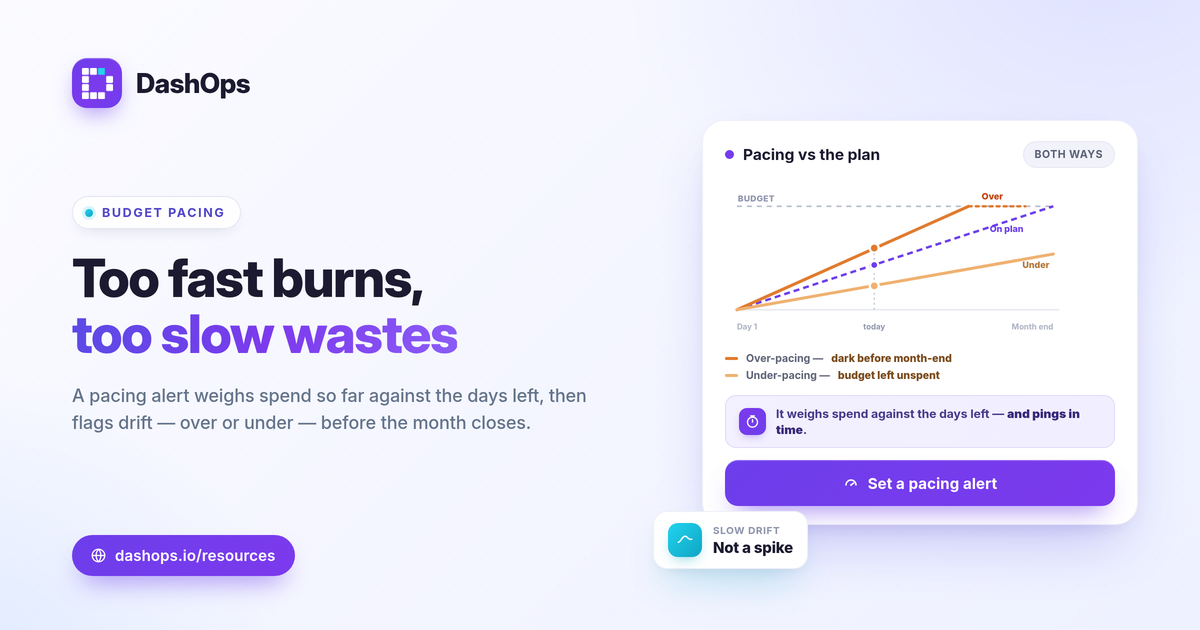
Pacing is the rate at which a campaign spends its budget over a set window, usually a calendar month. Even pacing means that by the time half the period has passed, roughly half the budget has been spent. Drift is when the actual rate pulls away from the planned rate in either direction.
You can reason about it with one comparison: amount spent versus planned budget, scaled by how far into the period you are. If you are only partway through the month but have already spent the large majority of the budget, you are over-pacing. If you are well into the period and have spent only a small slice, you are under-pacing.
Both directions are problems, and that is the part people underestimate.
Why over-pacing hurts
Over-pacing is the obvious failure mode. The budget burns out before the period ends, and the campaign goes dark for the days that remain.
- You lose the back end of the period. The last week may include your strongest demand, and you are no longer in the auction for it.
- Cost efficiency can slip. Spending fast often means pushing into a wider, more expensive slice of the auction, which can raise CPM and CPC. If you want the mechanics, see why did my CPM jump.
- Reporting gets noisy. A campaign that front-loads spend distorts period-over-period comparison and makes the month look unlike a normal one.
Why under-pacing hurts just as much
Under-pacing feels safe because you are not overspending. It is not safe. It is unused opportunity.
- Committed budget goes unspent. For an agency or in-house team working to a planned number, leaving budget on the table is a missed-results problem and an awkward conversation.
- It usually signals a delivery issue. Narrow audiences, low bids, rejected ads, or a campaign stuck restarting the learning phase all suppress delivery. Under-pacing is often the first visible symptom.
- You find out too late to fix it. A campaign that quietly under-delivers all month cannot be rescued on the final day.
The honest read on both directions is the same: the budget number you set was a plan, and reality drifted from it without telling you.
How a pacing alert flags drift before the period ends
This is the value of campaign budget monitoring done automatically. Instead of you remembering to open Ads Manager and do the math, the system watches cumulative spend against your budget and the days remaining, then sends a message the moment the gap crosses a threshold you set.
A useful pacing alert explained in plain terms does three things:
- Tracks the cumulative number, not a single day. Ad spend pacing is about the whole period, so the alert compares total spend so far against where it should be by now.
- Fires on a threshold you choose. For example, notify me if projected spend will land more than a set distance above or below the budget.
- Reaches you where you work. A message in Slack or Discord, or an emailed digest, so the drift surfaces in your day rather than waiting for you to go looking.
That last part matters because the whole job of the alert is to compress the time between drift starting and you knowing about it.
Pacing alerts versus spike alerts
These two get confused, and they solve different problems.
| Budget pacing alert | Spend spike alert | |
|---|---|---|
| Watches | Cumulative spend vs planned budget | A sudden jump in a short window |
| Catches | Slow, steady drift over the period | A one-day or one-hour surge |
| Question it answers | Will I end the month over or under budget | Did something break or run away today |
Most advertisers benefit from running both. A spike alert catches the runaway ad set; a pacing alert catches the quiet drift a single-day check never sees. If you are deciding which signals are worth automating at all, Facebook Ads alerts worth automating walks through the short list.
What to do when an alert fires
An alert is only useful if you know the response. When a pacing alert lands, work through the obvious causes in order.
- If over-pacing: check whether a campaign budget was raised, whether a creative is scaling, or whether auction costs rose. You can lower budgets, tighten bids, or accept the higher rate if the results justify it.
- If under-pacing: check for rejected or paused ads, an audience that is too narrow, bids set too low, or a recent edit that reset the learning phase.
- Always check the trend, not just the snapshot. A period-over-period view tells you whether this drift is a one-off or a pattern. The same demographic and placement breakdowns that show where spend is going also show where delivery is stalling.
For the full set of metrics that make pacing readable in context, the Meta Ads KPIs to track guide covers spend, cost per result, and the comparison fields you need.
Where DashOps fits
DashOps reads spend and every other KPI across your Meta ad accounts in one dashboard, with period-over-period comparison and a spend pacing view built in, so drift is visible at a glance instead of buried in Ads Manager. Slack and Discord alerts and scheduled email digests bring the signal to you, and white-label client reports let you show pacing cleanly to whoever is paying for the budget. See what each plan includes on the pricing page, and the help center covers connecting accounts and setting up alerts.
The practical takeaway: judge pacing against your own planned budget and the days remaining, not a universal rule, and let an alert tell you the moment the two stop matching.
Frequently asked questions
What is a budget pacing alert?
What causes a campaign to pace incorrectly?
How is a pacing alert different from a spend spike alert?
See it in your own dashboard
DashOps brings Meta Ads reporting, campaign management, and white-label client portals into one place. Pick the plan that fits how you run ads.