Spend vs Budget vs Amount Spent in Meta Ads: What Each Number Really Means
Spend vs budget in Meta ads trips up reports because the words sound interchangeable but mean three different things. Budget is the limit you set going forward. Amount spent is the actual money Meta charged you, looking backward. Spend is the everyday word people use for amount spent, but it gets sloppy fast. When a report mixes these up, pacing looks wrong: a campaign that is on track reads as overspending, or an underdelivering one looks fine. Get the definitions straight and your Meta ads budget reporting tells the truth about where the money went and whether delivery is keeping pace.
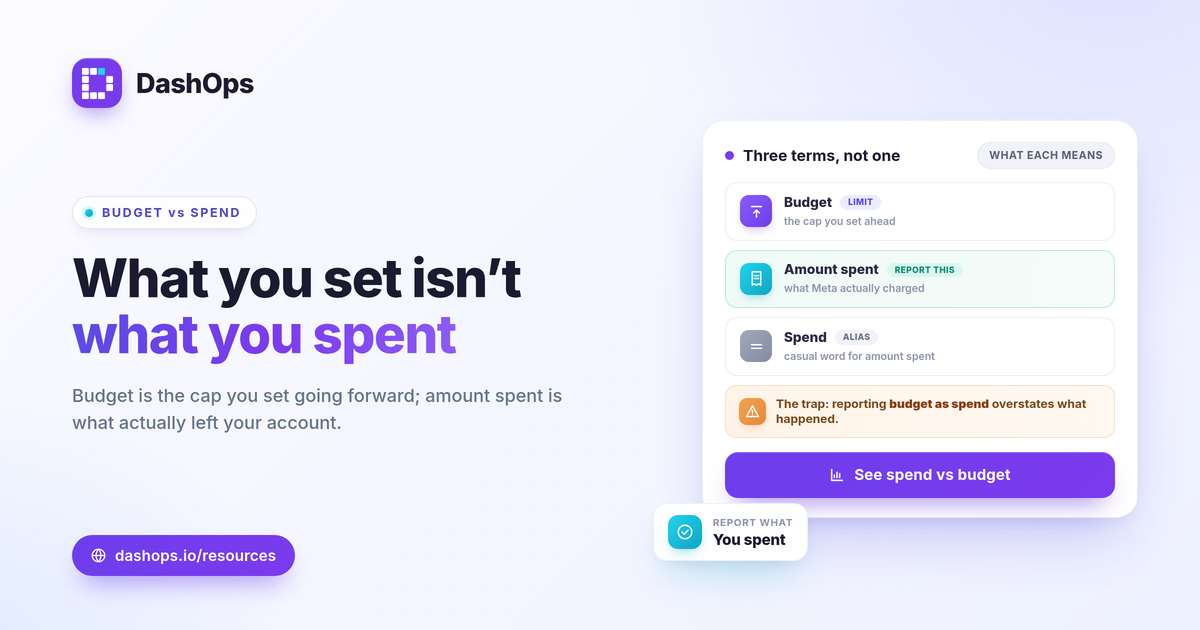
The three terms, defined plainly
These are not synonyms. Each answers a different question.
- Budget. The cap you set in Ads Manager, either a daily budget or a lifetime budget. It is a forward-looking instruction: do not spend more than this. It controls delivery; it does not describe it.
- Amount spent. The money Meta actually charged you over a date range. This is the real, delivered cost and the number you report. When someone asks what does amount spent mean, the short answer is: what you were billed for the period you selected.
- Spend. The casual word for amount spent. Most dashboards label the delivered-cost column “Spend.” That is fine, as long as everyone knows it means money already spent, not the budget set.
The trap is treating budget as if it were spend. Your budget might be set to a daily figure, but that does not mean you spent it. Only amount spent tells you what left your account.
Daily budget vs spend: why they rarely match
A daily budget is a ceiling and a target, not a promise. Meta paces delivery across the day and across the campaign, so daily budget vs spend almost never lines up exactly.
- Some days Meta spends under the daily budget because the audience is small, competition is low, or your schedule limits hours of delivery.
- Some days it spends slightly over, because Meta is allowed to exceed a daily budget on a given day as long as it averages out over the week.
- Lifetime budgets pace unevenly on purpose, front-loading or holding back to hit results across the whole flight.
So if you set a daily budget and the amount spent for a single day comes in lower, nothing is broken. Judge spend across the period, not day by day. The right comparison is total amount spent for the date range against the budget you planned for that same range.
Where reports get pacing wrong
Most pacing errors come from comparing the wrong two numbers or mismatching the dates.
- Reporting budget as spend. Pulling the budget field and calling it spend overstates what actually happened. Always report amount spent for delivered cost.
- Mismatched date ranges. Comparing a full-month budget against three weeks of amount spent makes pacing look slow when it is on track. Line up the dates first.
- Ignoring mid-period budget changes. If you raised the daily budget on the tenth, the original plan no longer reflects the target. Note the change so the pacing story makes sense.
- Account-level vs campaign-level mixups. Summing campaign budgets and comparing to account spend hides paused or deleted campaigns. Compare like with like.
If your numbers still feel off after this, the cause is often elsewhere: Ads Manager and downstream tools can show different figures for reasons unrelated to budget. Our guide on why Ads Manager numbers don’t match reports walks through that separately. Budget vs spend is a different issue, and worth ruling out first.
How to read pacing correctly
Pacing is a simple comparison once the terms are clean. Set the planned budget for the period, pull actual amount spent for the same dates, and look at the gap.
- Planned budget for the period. For a daily budget, multiply the daily amount by the number of days in the period. For a lifetime budget, use the full flight amount.
- Amount spent so far. Total delivered cost for the dates elapsed.
- Pacing. Whether spend is tracking ahead of, behind, or in line with where it should be at this point in the period.
There is no universal “right” pace. Judge it against your own plan: if you committed a set budget for the month and you are halfway through with roughly half spent, you are on track. Faster or slower than that is a signal to check delivery, not automatically a problem. The same logic applies to efficiency metrics, which you read against your own goals and prior-period trend rather than a fixed number, as covered in the Meta ads KPIs to track.
Spend in the wider metric picture
Amount spent is also the denominator under most of your efficiency metrics, which is another reason to keep it accurate.
- CPC = spend / clicks
- CPM = spend / impressions times 1000
- Cost per lead = spend / leads
- ROAS = conversion value / spend
If spend is wrong in a report, every one of these is wrong too. A budget figure mistakenly used as spend would quietly distort cost per result and ROAS across the whole report. That is why the distinction is not pedantic: amount spent feeds the math that decides whether the money worked.
Tracking actual spend against budget in a dashboard
Doing this by hand means exporting amount spent, lining up date ranges, and eyeballing it against a budget you keep in a separate sheet. It works, but it is slow and easy to get wrong, especially across several ad accounts.
DashOps reads amount spent for each connected Meta ad account with period-over-period comparison and a spend pacing view, so you can see delivered cost against the period without manual math, and tell at a glance whether pacing is on track. It reports Meta-native numbers, so the spend you see matches what Ads Manager charged. For agencies and teams sending these to clients, white-label client reports keep the pacing story clean and branded, as described in white-label client reporting. See what each plan includes on the pricing page, and the help center covers connecting accounts and setting budgets.
The takeaway: report amount spent as your real spend, compare it to a budget over matching dates, and pacing stops lying to you.
Frequently asked questions
What does amount spent mean in Facebook ads?
Why is my amount spent lower than my daily budget?
How do I track spend against budget in a report?
See it in your own dashboard
DashOps brings Meta Ads reporting, campaign management, and white-label client portals into one place. Pick the plan that fits how you run ads.