Shopify vs Meta Ads Manager Numbers: Why Your Sales Reports Do Not Match
Your Shopify dashboard and Meta Ads Manager will almost never show the same sales number, and that is expected, not a bug. The core of the Shopify vs Meta Ads Manager sales gap is that the two tools measure different things: Shopify records every order that actually completed in your store, while Meta records only the purchases it can attribute to an ad inside its own attribution window. The Shopify Facebook Ads discrepancy widens further because of view-through conversions, iOS opt-outs, and shoppers who click an ad once and buy days later. The honest goal is not to make the numbers tie out to the cent. It is to report both clearly and read the trend.
Why the two numbers diverge
Shopify and Meta are counting from opposite ends of the same purchase. Understanding each source explains most of the attribution mismatch in e-commerce reporting.
- Shopify counts orders, not ad credit. Every completed checkout shows up in Shopify regardless of how the buyer found you: an ad, an email, organic search, or a direct visit. It is your true revenue ledger.
- Meta counts attributed conversions. Meta only claims a purchase when it can tie that order back to someone who saw or clicked an ad within the attribution window. Orders it cannot connect simply do not appear in the ad platform’s purchase column.
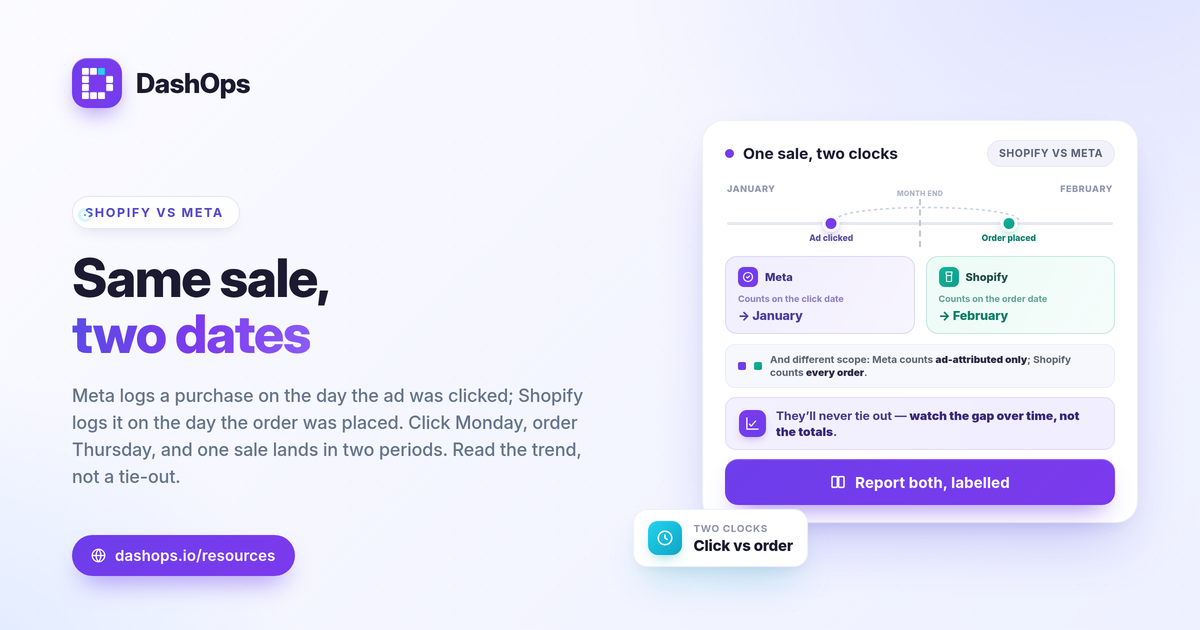
- Attribution windows pull purchases in time. Meta typically credits a conversion to the day of the ad interaction, not the day the sale happened. A click on Monday that converts on Thursday lands on Monday in Meta and Thursday in Shopify. Over a short reporting window, that shift alone creates a Meta Ads purchase discrepancy.
- View-through conversions inflate Meta’s side. Meta can credit a purchase to someone who saw an ad but never clicked. Shopify has no concept of that, so Meta may show purchases Shopify never associates with advertising at all.
The iOS and privacy effect
Since Apple’s App Tracking Transparency prompt, many users opt out of the tracking Meta relies on to connect an ad to a purchase. When that signal is missing, Meta cannot always match the sale back to the ad, so it undercounts. This is one of the most common reasons store-reported sales sit higher than Meta-attributed purchases. The sale still happened and Shopify still recorded it, but Meta never got the data to claim it. The effect is real and directional: it pushes Meta’s purchase count down relative to Shopify. The exact size of the gap depends on your audience, your devices, and your conversion setup, so judge it against your own prior periods rather than any universal figure. If you want the mechanics, see iOS Facebook ads underreporting.
What each number is actually good for
Once you stop expecting them to match, each tool earns a clear job.
- Shopify is your source of truth for revenue. When you need to know what you actually earned and what your true return looks like, use store-reported sales. Your real ROAS is calculated against money that genuinely landed in the business.
- Meta is your source of truth for which ads work. Meta’s purchase and ROAS columns, even when undercounted, tell you which campaigns, audiences, and creatives are driving response relative to each other. The absolute number may be conservative, but the comparison between ad sets is what guides budget.
- Use both, for different decisions. Shopify answers did the money work. Meta answers which ads to scale or cut. Forcing one tool to do both jobs is where reporting goes wrong.
How to reconcile Meta Ads and Shopify honestly
You cannot make these reconcile to the cent, and trying to is a trap. What you can do is reconcile them as a practice: report both, label them, and explain the gap once.
- Show both numbers side by side. Put store-reported revenue from Shopify next to Meta-attributed purchases in the same view. Hiding one to avoid an awkward question only creates a bigger one later.
- Label the source on every figure. A purchase number with no source label is the root of most disputes. “Shopify orders” and “Meta-attributed purchases” are different lines, not a single contested one.
- Explain the gap in one sentence. A short, standing note such as “Meta undercounts due to attribution windows and iOS opt-outs, so store revenue runs higher” defuses the question before it is asked.
- Watch the gap, not just the totals. A stable ratio between the two over time means your reporting is trustworthy. A sudden swing in that ratio is the real signal worth investigating, often a tracking or pixel issue.
Report the trend, not a forced match
The single most useful move in e-commerce reporting is to stop chasing a perfect tie-out and start reading direction. A period-over-period comparison on each source answers the question that actually matters: are store sales growing, and is Meta’s attributed performance moving the same way. If Shopify revenue climbs while Meta purchases hold steady, your ads may be assisting sales that other channels close. If both fall together, the problem is likely upstream in the campaigns. The relationship between the two trends tells you more than either number alone. For the wider picture of what to track, see Meta Ads KPIs to track.
Keep both views in one place
This is where a dedicated dashboard earns its keep. DashOps reports the Meta-native numbers exactly as Meta reports them: spend, purchases, ROAS, and 17+ KPIs with period-over-period comparison, so your Meta side is always accurate to the platform and never quietly blended or re-attributed. You keep Shopify as your revenue source of truth and use DashOps to read which ads are working and how that is trending, all in one place across every ad account. See what each plan includes on the pricing page, and the help center covers connecting your accounts. For how a purpose-built view compares to the native tool, see Facebook Ads Manager vs reporting dashboard.
The practical takeaway: treat Shopify as your revenue truth and Meta as your ad-performance guide, report both with clear labels, and judge success by the trend rather than a tie-out that will never happen.
Frequently asked questions
Which number is correct, Shopify or Meta Ads Manager?
Should Meta-reported purchases ever exactly match Shopify orders?
How do I report both numbers without confusing a client?
See it in your own dashboard
DashOps brings Meta Ads reporting, campaign management, and white-label client portals into one place. Pick the plan that fits how you run ads.