Reducing Meta Ads Management Burnout for Agencies
You know the feeling. It is Thursday afternoon, you have four browser tabs open on four different ad accounts, a client has just asked “quick question, how did last month go?” for the third time this week, and you are still not sure whether the campaign you paused on Tuesday was for Acme or for Globex. Nothing has gone wrong exactly. No account is on fire. You are just tired in a way that a weekend does not seem to fix.
Burnout in paid social work rarely comes from one dramatic crisis. It comes from the shape of the job: dozens of small interruptions, constant re-orientation, and a reporting cycle that arrives whether or not you had a good month. The usual advice is to take a break or set boundaries, which is fine as far as it goes but does not touch the machinery producing the exhaustion. This post is about the machinery.
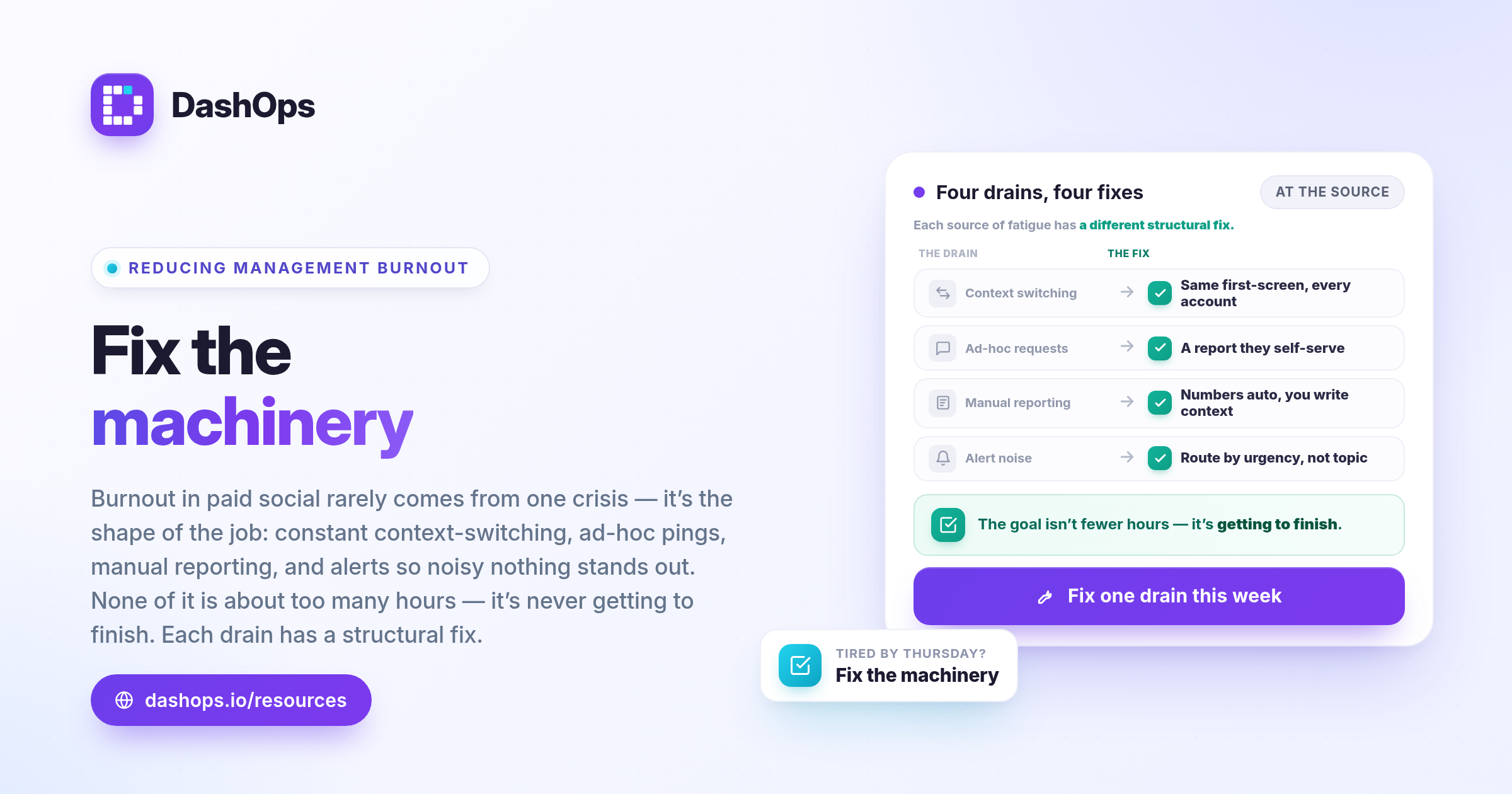
Where the fatigue actually comes from
If you list the things that leave you drained at the end of a week, most of them will fall into four buckets. They are worth naming precisely, because each one has a different structural fix.
- Context switching between ad accounts. Every time you move from one client to another, you rebuild a mental model: what their objective is, which campaigns are live, what you changed last, what they care about. The work of switching is invisible on a timesheet but it is the single most tiring part of managing many accounts.
- Ad hoc requests. A client emails asking for a number. Finding the answer is the easy part. Recovering the thread you were pulling on before the email arrived is not, because you were in the middle of something else and now you are not.
- Manual reporting. Assembling the same numbers, in the same order, into the same document, every month, for every client. It is unskilled work that only you can do, which is the worst combination.
- Alert fatigue. When everything notifies you, nothing does. You end up either ignoring the notifications entirely or reacting to all of them, and both outcomes are expensive.
Notice that none of these are about working too many hours. They are about working in a way that never lets you finish anything. That is what wears people down.
Reduce the cost of switching, not the number of switches
You cannot stop switching between accounts. You can make each switch cheaper.
The cost of a switch is the time between opening an account and knowing what is going on in it. If the first thing you see is a raw list of campaigns with no comparison to last period, you have to do the analysis yourself before you can even begin the work. If the first thing you see is a dashboard with the metrics you actually care about, compared to the previous period, you have skipped the reconstruction step entirely.
Some practical ways to shorten the runway:
- Standardise what you look at first. Decide on a small set of headline metrics that answer “is this account healthy” for you, and put them in the same place on every account. In DashOps you can customise which KPI cards appear and drag them into the order you think in, so the first thing you read is the measure you actually judge an account on.
- Save the views you keep rebuilding. If you always filter to active campaigns sorted by spend for a particular client, save it once. Rebuilding a filter is a small tax paid many times a day.
- Name things so future you can read them. A campaign called “Retargeting v3 final” tells you nothing in six weeks. A naming convention that encodes audience, objective and launch month means you can orient from the campaign list alone.
- Write down what you changed and why. Not a formal document. A one line note attached to the account. When a client asks in November why performance shifted in September, you want an answer that does not require archaeology.
Turn ad hoc requests into a schedule
Most client questions are not urgent. They feel urgent because they arrive as an email addressed to you personally, and because the client has no other way to find out.
The fix is to give them another way. When a client can see their own numbers whenever they want, the volume of “quick question” emails drops, and the ones that remain tend to be better questions.
Two structural moves help here. The first is read-only client access: give each client a login that shows only the ad accounts assigned to them, with the option to hide spend if your commercial arrangement calls for that. The second is a share link for a snapshot, which is useful when a client wants to forward results to someone internally who does not need an account of their own.
There is also a middle path that costs you nothing ongoing: a scheduled email report that arrives on the same day every week or month. A client who knows a report is coming on Monday is far less likely to ask on Friday. If you have never set one up, automated Meta Ads email reports covers the mechanics, and the weekly digest pattern is a good starting cadence for accounts that do not need a full monthly write-up.
Stop rebuilding the same report
Manual reporting is the clearest example of work that feels productive and is not. You are transcribing. The value you add is in the interpretation, and the transcription is eating the time you would have spent interpreting.
The structural fix is to separate the two. Let the numbers assemble themselves into a PDF or Excel file, and spend your effort on the two or three sentences of context that only you can write. That is the part clients actually read and the part that justifies your fee.
If you want to take reporting off your plate methodically rather than all at once, how to automate Facebook Ads reports walks through the order to do it in, and reducing time spent on Facebook Ads reporting is worth reading if you are not sure which parts of your current process are actually necessary.
One warning: automating a bad report just produces a bad report faster. Before you automate, cut the report down to what the client uses. Most reports contain sections nobody has ever asked about, kept because they were in the template from the beginning.
Fix your notifications before they fix you
Alert fatigue has a specific failure mode. You start with useful notifications, add more over time, and eventually reach a point where the signal is buried. Then you stop reading them, and the one that mattered goes past unnoticed. Now you have all the noise and none of the benefit.
The cure is aggressive subtraction. Go through your notification settings and, for each type, ask a blunt question: if this fired right now, would I stop what I am doing? If the answer is no, switch it off or move it to a digest.
A reasonable shape for most agencies looks like this. Things that need a human immediately, such as a broken account connection or a sync failure, go to a channel you actually watch, which for many teams is Slack or Discord rather than email. Things that are informational, such as daily performance, go into a scheduled digest you read at a set time. Everything else goes off.
That split is worth setting up deliberately rather than leaving to defaults. DashOps sends alerts in the app, on the desktop, and into Slack or Discord, and keeps email digests on their own daily, weekly or monthly schedule, so the urgent channel and the informational one do not have to be the same place.
Route by urgency, not by topic. The temptation is to turn on every notification about campaigns because campaigns are important, but importance and urgency are different things, and only urgency justifies an interruption.
Make the workload visible and shared
A lot of paid social burnout is quietly a delegation problem. One person holds every account in their head because access is all or nothing, so nobody else can safely touch anything.
Roles and per-member account assignment change that. When a team member can be given a specific set of ad accounts rather than the whole agency, you can hand over a client properly instead of hovering. The person taking over sees the same dashboard you see, scoped to what is theirs, and an audit log records who changed what if a question comes up later.
This matters even in a team of two. The point is not organisational tidiness, it is that a job which only one person can do is a job that follows that person on holiday. If you are restructuring how work moves through your agency, the Meta Ads agency workflow piece goes deeper on the operational side.
Protect the shape of your week, not just your hours
Structural fixes buy you back time. What you do with that time determines whether the fatigue actually lifts.
The thing to protect is uninterrupted blocks. An unbroken run at a problem is worth more than the same total time chopped into fragments, and the difference is not marginal. Concretely:
- Batch account reviews into one or two sessions rather than checking accounts throughout the day.
- Pick a fixed window for client communication and let email sit outside it.
- Do the thinking work, such as strategy, creative direction and diagnosis, when you are freshest, and leave the mechanical work for the afternoon.
- Give yourself an actual end to the day. Ad accounts run overnight regardless of whether you are watching them.
None of this is novel advice. It only becomes possible once the underlying work has been restructured, which is why it comes last rather than first.
What to do this week
Do not attempt all of this at once. Pick the one that is costing you most and change it properly.
- Audit your notifications and turn off everything that would not make you stop what you are doing right now.
- Choose your most reporting-heavy client and set up a scheduled report for them, then tell them it is coming.
- Standardise the metrics you look at first when opening any account, so every switch starts from the same place.
- If you have a teammate, hand over one account fully, with their own scoped access, rather than doing it yourself out of habit.
Then leave it for a couple of weeks and see how Thursday afternoon feels. The goal is not to work less. It is to finish things.
Frequently asked questions
What causes burnout in paid social teams?
How do I stop clients sending so many ad hoc requests?
Is automating reports enough to fix reporting fatigue?
How should I set up notifications to avoid alert fatigue?
Can delegating ad accounts really reduce workload stress?
See it in your own dashboard
DashOps brings Meta Ads reporting, campaign management, and white-label client portals into one place. Pick the plan that fits how you run ads.