Meta Conversions API Explained: How It Fixes Reporting Gaps in Your Ad Dashboard
The Meta Conversions API explained in one line: it is a server-to-server connection that sends conversion events to Meta directly from your website or CRM, instead of relying only on the browser. That matters because browser-based tracking misses events, and missed events mean Meta cannot attribute results it actually drove. Server-side tracking for Meta Ads recovers some of those lost conversions, which makes your reported numbers more complete. This post covers what the Conversions API is, why the browser misses conversions, how CAPI conversion tracking fits alongside the Pixel, and how the cleaner numbers flow into your DashOps reporting dashboard.
What the Conversions API actually is
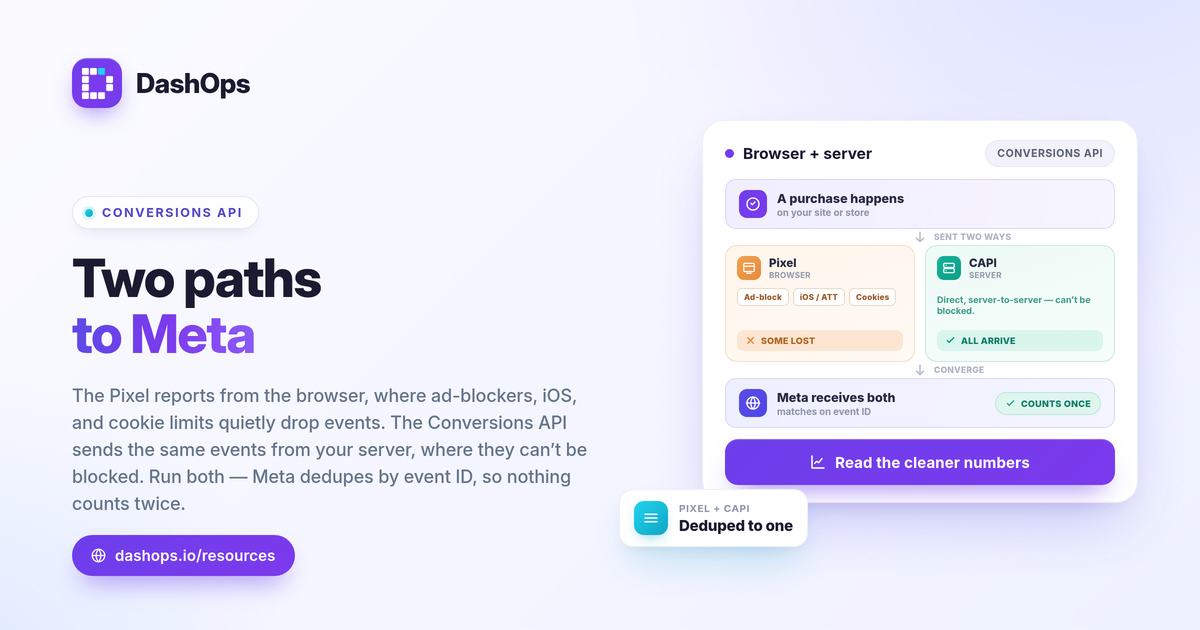
The Pixel is a piece of JavaScript that runs in the visitor’s browser and reports actions like a purchase or a lead back to Meta. The Conversions API (CAPI) does the same job from a different place: your server, your store platform, or a connected tool sends the event to Meta over an API call.
Think of it as two reporters covering the same event. One stands in the browser; the other stands on your server. When the browser reporter gets blocked or interrupted, the server reporter still files the story.
- Pixel: client-side, runs in the browser, easy to set up, vulnerable to blocking.
- Conversions API: server-side, runs from your infrastructure, harder to block, needs configuration.
The recommended approach is to run both, not one or the other.
Why the browser misses conversions
Browser-based tracking has become less reliable, and the gap is not a bug in your account. Several forces chip away at it at once.
- Ad blockers and privacy browsers. Many users run extensions or browsers that block tracking scripts outright. If the Pixel never fires, the event never reaches Meta.
- iOS and ATT. Apple’s App Tracking Transparency lets users opt out of tracking. When they decline, Meta loses signal it would otherwise have used to attribute a conversion. The effect is qualitative but real: it causes conversions to be undercounted, so your dashboard can understate results that your ads genuinely produced.
- Cookie restrictions and session timeouts. Shortened cookie lifespans and dropped sessions break the chain between a click and a later purchase.
The result is undercounting. A sale happened, your ad helped cause it, but the browser signal never made it back to Meta, so the conversion does not appear in your reports. This is one of the main reasons Facebook ad conversions look lower than the sales you can count in your store or CRM.
How server-side tracking recovers lost conversions
Your server is not subject to the same blocking as the browser. When a customer completes a purchase, your backend already knows it happened. CAPI conversion tracking takes that confirmed event and sends it to Meta directly, with whatever matching information you have permission to share, such as a hashed email or order value.
Because the event originates server-side, ad blockers and browser restrictions cannot intercept it. Meta receives a more complete picture of which actions occurred, which improves attribution and, in turn, Facebook ad reporting accuracy.
This does not mean CAPI invents conversions or inflates numbers. It recovers events that genuinely occurred but were lost in transit. The goal is accuracy, not a bigger figure for its own sake.
Pixel and Conversions API together: deduplication
A fair question: if both the Pixel and CAPI report the same purchase, does Meta count it twice? No, as long as setup is correct. Each event carries an event ID, and Meta uses that ID to deduplicate. When the browser event and the server event describe the same action, Meta keeps one and discards the duplicate.
So the two sources are not redundant in a wasteful way. They are a safety net:
- If the browser event arrives, Meta uses it.
- If the browser event is blocked, the server event fills the gap.
- If both arrive, deduplication keeps a single conversion.
That is why the Pixel versus Conversions API framing is misleading. It is not a choice. The Pixel handles rich in-browser signals; CAPI handles reliability. Running both is the standard configuration.
Conversions API setup, in plain terms
You do not write the API calls yourself in most cases. Conversions API setup usually happens through one of these paths:
- A native integration. Many store and CRM platforms have a built-in Conversions API connection you enable and authorize.
- A partner or gateway tool. Tag managers and conversion gateways can send server events for you.
- A direct developer integration. For custom stacks, a developer wires the API into your backend.
Whichever path you use, the important checks are the same: events are firing, the Pixel and CAPI share event IDs so deduplication works, and event match quality is healthy. Those are configured in Meta and your platform, not in a reporting dashboard.
Attribution windows still shape what you see
Even with CAPI in place, Meta counts conversions within an attribution window: the period after a click or view during which a conversion gets credited to the ad. A 7-day click window credits purchases that happen within seven days of a click. Change the window and the same campaign can show a different number of conversions and a different ROAS.
This is worth keeping in mind because it explains a lot of confusion. CAPI improves how many real events Meta receives. Attribution settings decide how those events get credited. Two reports built on different windows will not match, even when both are correct. For a deeper look, see attribution windows explained and why Facebook ad conversions are lower than sales.
How this flows into your reporting dashboard
Once CAPI is sending events and Meta is attributing them, the cleaner conversion data lives in Meta’s numbers. That is exactly what a reporting dashboard reads. DashOps reports Meta-native figures: it pulls the conversions, purchases, leads, ROAS and cost per result that Meta reports, and shows them across your ad accounts with period-over-period comparison. It does not perform its own blended or server-side attribution; it helps you read Meta’s reported numbers consistently across every dashboard, export, and client report.
A practical benefit: when your reporting always reflects the same Meta-native source, you avoid the situation where two reports show different ROAS for the same campaign. Consistency is what makes a number trustworthy to whoever reads it. If you want a refresher on the underlying metrics, Meta Ads KPIs to track walks through them, and Ads Manager versus a reporting dashboard covers why the two views can diverge.
DashOps connects your Meta ad accounts and surfaces the post-CAPI numbers in one place, with exports and white-label client reports built on the same data. See what each plan includes on the pricing page, and the help center covers connecting accounts and reading the figures.
The takeaway: set up the Conversions API alongside the Pixel to recover conversions the browser misses, then read the cleaner numbers consistently in one dashboard so every report tells the same story.
Frequently asked questions
Does the Conversions API replace the Meta Pixel?
Will the Conversions API make my Facebook ad reporting match my actual sales exactly?
Does DashOps set up the Conversions API for me?
See it in your own dashboard
DashOps brings Meta Ads reporting, campaign management, and white-label client portals into one place. Pick the plan that fits how you run ads.