How to Build a Facebook Ads Spend Pacing Report So You Never Overspend
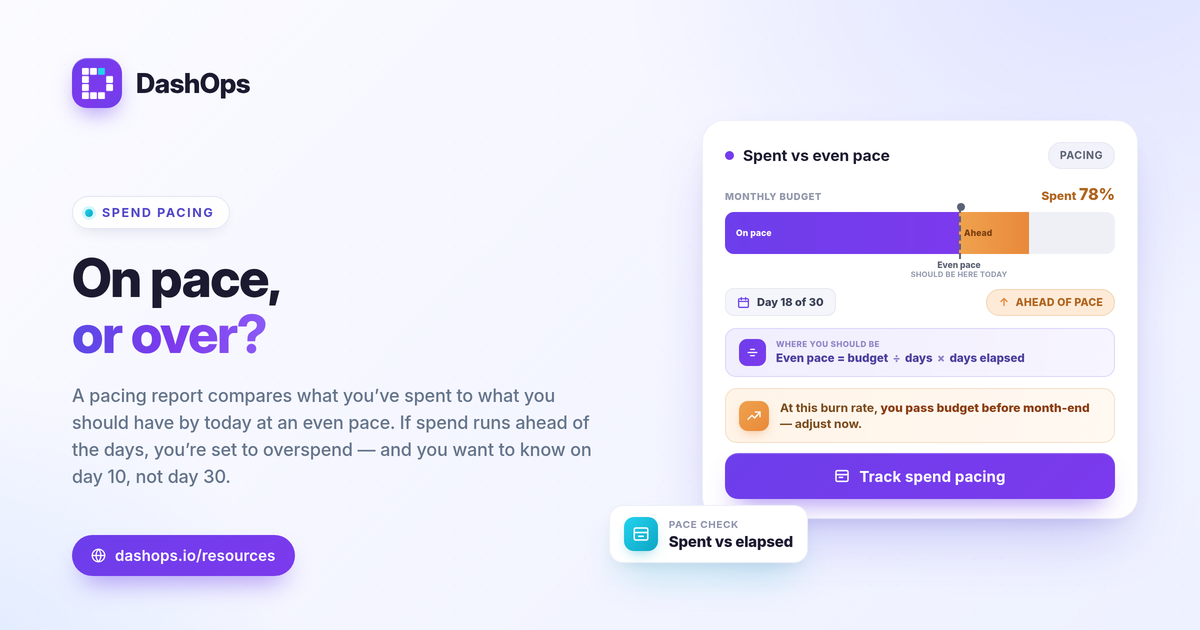
A Facebook Ads spend pacing report tracks how fast your budget is burning against the days left in the month, so you can see whether you are on track, ahead, or behind while there is still time to adjust. The idea is simple: compare what you have actually spent to what you should have spent by today if the budget were spread evenly, then act on the gap. Done well, it catches an overspend on day 10 instead of day 30, and it surfaces underspending that quietly leaves results on the table. Here is how to build one that holds up.
What a spend pacing report actually answers
A pacing report has one job: tell you whether your current burn rate will land you on, over, or under your monthly budget by month end. Everything else supports that answer.
It works off a small set of numbers you already have:
- Monthly budget. The total you plan to spend across the account or campaign this month.
- Spend to date. What Meta shows as amount spent so far this month.
- Days elapsed and days remaining. How far into the month you are.
- Expected spend to date. Budget divided by total days, times days elapsed, if you pace evenly.
The gap between spend to date and expected spend to date is your pacing signal. Spend ahead of schedule means you risk running out early. Spend behind schedule means you may not use the full budget, which often means missed results.
The pacing math, step by step
You do not need anything fancy. A clean monthly ad budget pacing view comes from a few formulas.
- Daily pace target = monthly budget / days in month. This is the even-spend line.
- Expected spend to date = daily pace target times days elapsed. Where you should be today.
- Pacing variance = spend to date minus expected spend to date. Positive means overspending, negative means underspending.
- Projected month-end spend = (spend to date / days elapsed) times days in month. Your current burn rate, carried forward.
The projected month-end number is the one most people miss. Spend to date alone does not tell you where you will land. A campaign that looks fine at the halfway mark can still blow past budget if the burn rate is climbing, which is exactly what the projection catches.
Build the report column by column
Whether you start in a spreadsheet or an ad spend tracking dashboard, the layout is the same. One row per ad account or campaign you are pacing, with these columns:
- Budget. The monthly cap for that line.
- Spend to date. Pulled from Meta for the current month.
- Expected to date. The even-pace figure for today.
- Variance. Spend to date minus expected, in currency and as a percentage of budget.
- Projected month-end. Burn rate carried to the last day.
- Status. A plain label: on track, overspending, or underspending.
Keep the status thresholds tied to your own tolerance. A few percent of variance is normal noise. A consistent double-digit gap that widens day over day is the one to act on. There is no universal “safe” variance number, so set the band that matches how tightly you manage the account, then judge each line against it and against last month’s pattern.
Read the pacing signal in context
A raw variance figure can mislead if you read it cold. Two things put it in context.
- The trend, not the snapshot. Period-over-period comparison shows whether this month is pacing like last month or breaking from it. A single day’s variance can swing on one high-spend day; the trend tells you if it is a real shift.
- The reason behind the burn. Rising spend is not automatically bad. If cost per result held steady and you are simply getting more volume, faster pacing may be fine. If the burn is climbing because CPMs jumped and efficiency dropped, that is a different problem. For the metrics that explain why costs move, see Meta Ads KPIs to track.
This is also why pacing pairs naturally with your efficiency metrics. Pacing tells you how fast the money is going; ROAS, cost per purchase, or cost per lead tell you whether that speed is worth it.
Spend pacing alerts beat manual checks
A report you have to open every morning is a report you will eventually forget to open, usually right before the budget overshoots. The fix is to let pacing watch itself.
- Set a threshold. Decide the variance or projected-overspend level that should trigger a flag, for example projected month-end running above budget by a meaningful margin.
- Get pushed, not pulled. Spend pacing alerts can land in Slack or Discord, or arrive as a scheduled email digest, so you hear about a problem the day it starts rather than on reconciliation day.
- Watch for spikes too. A sudden jump in daily spend, separate from the slow monthly drift, deserves its own alert. A budget pacing alert and a spend spike alert cover different failure modes.
If you want the background on how these triggers work, what is a budget pacing alert goes deeper.
Common pacing mistakes to avoid
- Reading spend to date without a projection. Halfway through the month does not mean halfway through the budget if the burn rate is rising.
- Ignoring underspending. Pacing behind budget is not a win. It usually means delivery is constrained or a campaign stalled, and you are leaving results unclaimed.
- Pacing each campaign blind to the account total. One campaign under budget can mask another running hot. Pace at both the campaign and account level.
- Forgetting that reported spend can lag. Meta’s amount spent settles over a short window, so very recent figures can adjust slightly. Pace on the trend, not on a single live hour.
Where DashOps fits
DashOps reads spend, budget pacing, and the full set of Meta KPIs across all your ad accounts in one ad spend tracking dashboard, with period-over-period comparison and spend pacing built in, so the projection and variance are there without rebuilding a spreadsheet each month. You can route spend pacing alerts to Slack or Discord, schedule email digests, and share read-only or white-label views with clients. See what each plan includes on the pricing page, and the help center covers setup. For how a live dashboard compares to the native tool, Ads Manager vs a reporting dashboard lays it out.
The practical takeaway: pace against your projected month-end spend, not just the total so far, and set an alert at your variance threshold so the report catches an overshoot while you can still fix it.
Frequently asked questions
What is a Facebook Ads spend pacing report?
How do you calculate spend pacing?
What is a good pacing variance to allow?
See it in your own dashboard
DashOps brings Meta Ads reporting, campaign management, and white-label client portals into one place. Pick the plan that fits how you run ads.