Facebook Ads CPM Benchmark by Industry: What You Should Pay Per 1,000 Impressions
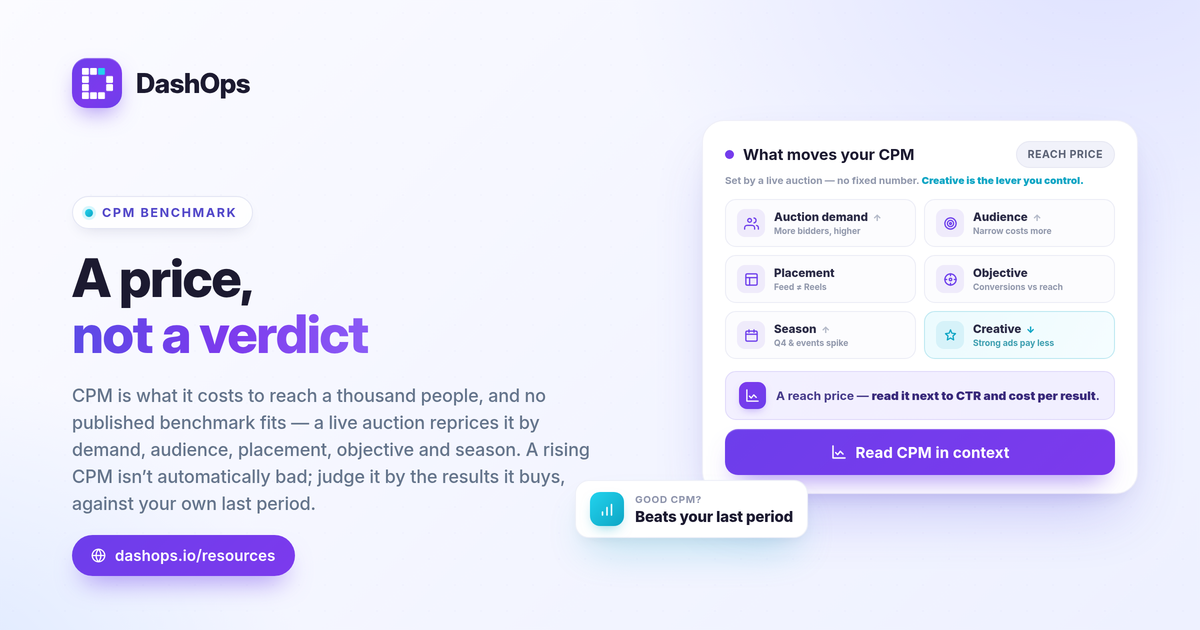
CPM, or cost per thousand impressions, is what Meta charges to show your ad 1,000 times, and there is no single Facebook Ads CPM benchmark by industry that you can hold yourself to. Real CPM ranges vary so widely by industry, audience, placement, objective, and season that any one published number is misleading the moment you apply it to your account. The useful move is to learn the formula, understand what actually moves CPM, and compare your cost per thousand impressions against your own recent history. That self-comparison tells you far more than a borrowed average.
What CPM measures and how to calculate it
CPM is an efficiency metric for buying attention, not results. It answers one question: how much does it cost to put your ad in front of a thousand sets of eyes in the auction.
The formula is simple:
- CPM = spend / impressions times 1,000. If you spent on a campaign and it served a given number of impressions, divide spend by impressions and multiply by 1,000.
Meta reports CPM directly, so you rarely calculate it by hand. What matters is reading it in context. A rising CPM is not automatically bad and a falling CPM is not automatically good. CPM is the price of inventory; whether that price is worth paying depends on what those impressions convert into downstream.
Why a single average CPM for Facebook Ads is misleading
People search for an average CPM Facebook Ads figure or a Meta CPM by industry table hoping for one number to grade against. The honest answer is that CPM sits inside a live auction, and the auction reprices constantly. A clothing brand, a solar installer, and a local dentist can all run on Meta and see very different CPMs for reasons that have nothing to do with how well their ads are built.
Treat any universal CPM benchmark with suspicion, because the same vertical can show wildly different CPMs depending on the factors below. That is exactly why comparing against your own account beats chasing one published median.
What actually moves your CPM
CPM is set by supply and demand for the audience you are trying to reach. The main drivers:
- Auction demand. When more advertisers bid for the same people, the clearing price rises. Competitive seasons push CPM up.
- Audience. Narrow, high-value, or heavily contested audiences cost more to reach than broad ones. B2B and high-intent audiences tend to sit at the expensive end.
- Placement. Feed, Stories, Reels, and other placements price differently. An Instagram CPM benchmark you read somewhere may not match your own placement mix at all.
- Objective and optimization. Optimizing for conversions versus reach changes who Meta tries to show your ad to, which changes the price.
- Season and timing. Q4, major shopping events, and election windows raise demand and therefore CPM. The same campaign can cost more in November than in February.
- Creative and relevance. Stronger engagement signals can help your ad win the auction more efficiently, which can pull effective CPM down.
Because all of these shift independently, your CPM is a moving target. The number to beat is your own.
How to read your CPM against the right benchmark: yourself
The most reliable benchmark for cost per thousand impressions is your own prior period. Period-over-period comparison turns a raw CPM into a signal you can act on.
- Compare to last period. Is this month’s CPM higher or lower than last month’s for the same campaigns and audiences? That delta is the real story.
- Watch CPM alongside frequency. If CPM climbs while frequency rises, you may be saturating your audience and paying more to reach the same people repeatedly. A demographic and placement breakdown plus frequency as a KPI helps you spot fatigue rather than guess at it.
- Tie CPM to downstream cost. A higher CPM is fine if your cost per purchase or cost per lead held steady or improved. CPM only matters in service of the result it produces.
- Segment before you judge. A blended CPM across every placement and audience hides the expensive pockets. Break it out by placement and demographic to see where the cost actually lives.
This is the difference between reporting a number and understanding it. For more on which metrics belong next to CPM, see our guide to the Meta ads KPIs to track, and if your CPM moved suddenly, why did my CPM jump walks through the usual causes.
CPM versus the metrics it feeds
CPM is an input, not a verdict. It rolls into the costs you actually care about, so reading it in isolation invites the wrong conclusion.
| Metric | Formula | What it tells you |
|---|---|---|
| CPM | spend / impressions times 1,000 | Price to reach 1,000 people |
| CPC | spend / clicks | Price of a click |
| CTR | clicks / impressions | How often impressions become clicks |
| Cost per lead | spend / leads | Price of a lead |
| ROAS | conversion value / spend | Return per unit of spend |
A high CPM paired with a strong CTR can still produce cheap clicks, because more of those expensive impressions turn into action. That is why you read CPM next to CTR and your cost per result, never on its own. For the broader relationship between these two metrics, CPM vs CPC in Meta ads is a useful companion.
A note on iOS and reporting accuracy
CPM itself is a clean, Meta-native number: it is based on impressions served and money spent, both of which Meta measures directly. The downstream metrics it feeds, like conversions and ROAS, can be undercounted because of iOS App Tracking Transparency limits, which suppress some conversion signal. That undercounting can make a campaign look less efficient than it is, so when CPM looks high relative to results, check whether attribution gaps are part of the picture before blaming the auction price.
Where DashOps fits
DashOps reports CPM as one of 17 or more Meta KPIs across every connected ad account, with period-over-period comparison built in, so you can see whether your cost per thousand impressions is rising against your own history rather than against a borrowed industry figure. Demographic and placement breakdowns let you find where CPM is actually expensive, and trend charts show fatigue building over time. See what each plan includes on the pricing page, and the help center covers connecting your ad account and reading the dashboard.
The practical takeaway: stop hunting for one universal CPM number and start measuring your CPM against your own last period, alongside the results it produces.
Frequently asked questions
What is a good CPM for Facebook Ads?
How is Facebook Ads CPM calculated?
Is Instagram CPM higher than Facebook CPM?
See it in your own dashboard
DashOps brings Meta Ads reporting, campaign management, and white-label client portals into one place. Pick the plan that fits how you run ads.