White Label Meta Ads Dashboard: What It Is and How It Works
A white label Meta Ads dashboard is a reporting and analytics dashboard that carries your brand instead of the software vendor’s. Your logo, your colors, and on the fuller plans your own domain and email sender replace the tool’s identity, so clients see your company doing the work rather than the platform underneath. It matters because for anyone who reports to a client, the dashboard and the report are part of the product. This guide explains what a white label Meta Ads dashboard is, who actually needs one, and how branding, client access, and reporting fit together.
What “white label” really means
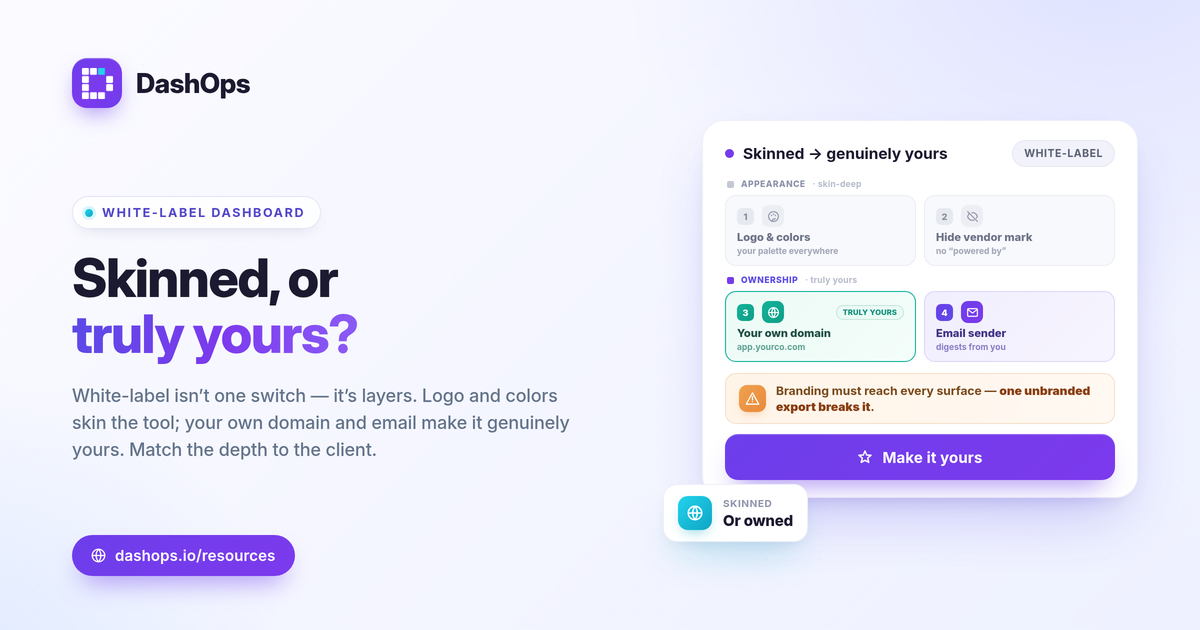
White label is not a single switch. It is a set of layers, and different tools unlock different depths. Think of it as moving from “skinned” to “genuinely yours.”
- Your logo and colors. The dashboard, the login page, and the exported reports use your brand palette instead of the vendor’s. This is the lightest and most common layer.
- Hide the vendor mark. The small “powered by” line disappears, so there is no third-party branding anywhere the client looks.
- Your own domain. Clients log in at a URL you own, for example app.yourcompany.com, rather than the vendor’s address. This is the layer that makes the experience feel truly yours.
- Your own email sender. Automated report emails and digests go out from your domain, so even the inbox looks like you.
The first two layers are about appearance. The last two are about ownership, and they are what separate white label Facebook Ads reporting that is lightly skinned from a branded Meta Ads dashboard that a client would never guess sits on a third-party tool.
Who actually needs one
Not everyone does, and that is worth being honest about. If you only run ads for your own business and nobody outside reviews the numbers, plain reporting is fine. White label earns its place the moment a second party reads your reports.
- Agencies. The clearest fit. A branded client dashboard reinforces that the value comes from you, not from a tool the client could go find themselves.
- Freelancers and solo advertisers. A clean, branded portal makes a one-person operation look every bit as established as a larger shop. That is a real competitive edge when you are pitching against bigger names.
- In-house marketing teams. Reporting up to leadership or to other departments reads better when it carries the company brand rather than a vendor logo that invites the question “what are we paying for this tool?”
The common thread is simple: anyone who hands a Meta Ads report to someone else benefits from that report looking like their own work.
How branding, access, and reporting fit together
A white label Meta Ads dashboard is really three systems working as one. Getting the relationship right is what makes it feel polished rather than bolted on.
Branding is the surface layer. It flows everywhere the client touches: the dashboard, the client portal, the PDF and Excel exports, and the scheduled email digests. If branding only reaches one of those, the illusion breaks the first time a client opens an unbranded export.
Client access is the control layer. A good setup gives each client a simplified, read-only view of only the ad accounts assigned to them, in plain language, rather than a copy of your full operator dashboard. You also decide what they see. If you bill a flat retainer rather than passing through ad spend, the ability to hide cost figures from the client view while still showing results keeps your pricing your own business.
Reporting is the substance. Branding without good numbers is just a nice wrapper around nothing. The dashboard underneath should read every Meta KPI across your ad accounts, with period-over-period comparison so the client can see what changed, not just a snapshot. For a refresher on which numbers belong in front of a client, the Meta Ads KPIs worth tracking is a good starting point.
What to look for when you evaluate one
When you compare a white label reporting software option for client work, check how far the branding goes and how much effort it takes to set up.
- Does branding flow to every surface? Logo and colors should appear on the dashboard, the client portal, the exports, and the email digests, not just the login screen.
- Is there a real client portal? Clients should get a simplified, read-only view of only their own accounts, written in plain language.
- Can you control what clients see? The tool should let you hide spend and cost figures when you need to, while still showing the results that prove your work.
- How hard is the custom domain? It should be a guided set of DNS records with an automatic SSL certificate, not a support ticket and a week of waiting.
- Does it cover delivery, not just a live view? Scheduled PDF reports, share links, and a client login each suit a different client, so the best tools offer all three.
A quick way to judge the depth you need
You do not have to buy the fullest plan to look professional. Match the layer to the situation.
| Situation | Branding layer that fits |
|---|---|
| Solo advertiser, no external clients | None needed |
| Freelancer or small team with a few clients | Logo, colors, hide the vendor mark |
| Agency that wants the experience to feel fully owned | Custom domain and custom email sender |
The point is to spend on the depth your relationships actually call for, and no more.
DashOps offers white-label across its plans, so you only pay for the depth you need. The Growth plan includes white-label Lite, which covers your logo, brand colors, and hiding the DashOps footer mark across the dashboard, the client portal, the reports, and the digests. The Enterprise plan includes white-label Full, which adds a custom domain and a custom email sender, with the DNS records walked through and the SSL certificate provisioned automatically. Either way, clients get a clean, read-only portal showing only their assigned ad accounts, and you decide whether spend is visible. See what each plan includes on the pricing page, the help center covers setup, and if you want the deeper view of branded reporting itself, read how white-label client reporting works.
A white label Meta Ads dashboard is not about hiding the tool. It is about keeping the spotlight on the relationship you have built, so start with the branding layer your clients will actually notice and add depth from there.
Frequently asked questions
What is a white label Meta Ads dashboard?
Is a white label dashboard only useful for agencies?
Do I need a custom domain to use white-label branding?
See it in your own dashboard
DashOps brings Meta Ads reporting, campaign management, and white-label client portals into one place. Pick the plan that fits how you run ads.