White Label Lite vs White Label Full for Meta Ads Reports: Which Do You Need?
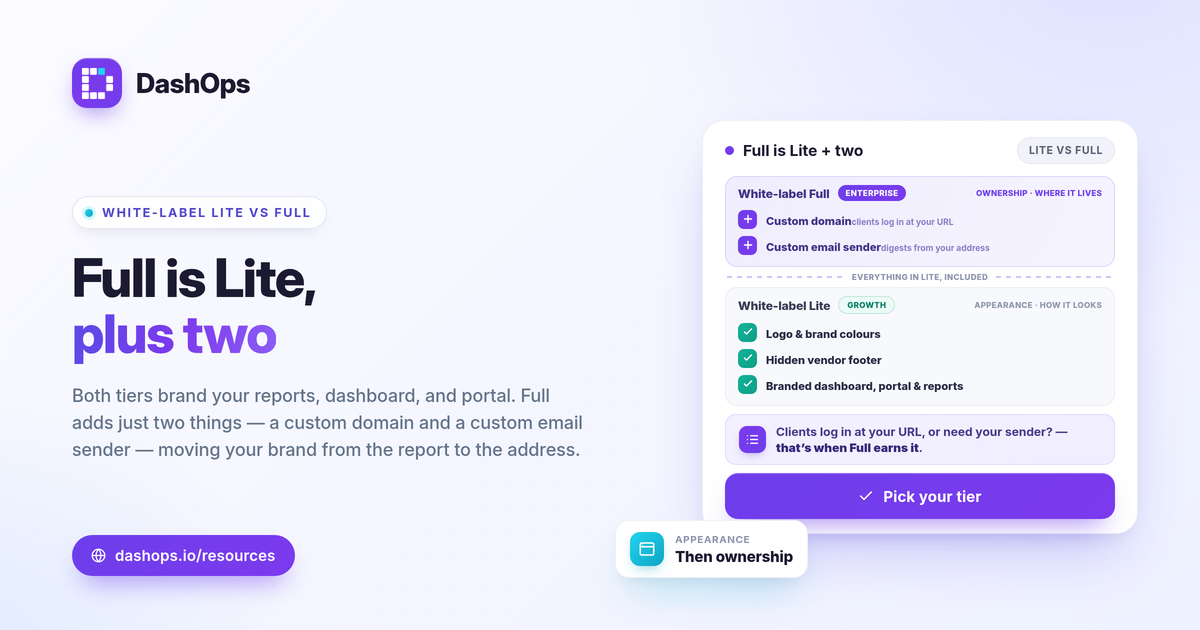
If you send Meta Ads reports to clients, the question behind “white label Lite vs Full” is simple: how much of the experience needs to look like yours, and where does the line sit. White label Lite, on the Growth plan, brands the dashboard, reports, and client portal with your logo and colours and removes the vendor footer. White label Full, on the Enterprise plan, adds the two ownership layers Lite cannot: a custom domain your clients log in to, and a custom email sender for digests. Lite makes reports look like you. Full makes the whole experience feel like it lives at your company. Here is how to pick.
What each tier actually includes
The two tiers are a clean split between appearance and ownership.
- White label Lite (Growth). Your logo and brand colours flow across the dashboard, the simplified client portal, and PDF, Excel, and CSV reports. The DashOps footer mark is hidden, so there is no third-party branding where the client looks. Clients still log in at the standard app address.
- White label Full (Enterprise). Everything in Lite, plus a custom domain so clients sign in at a URL you own, for example app.yourcompany.com, and a custom email sender so scheduled digests and client reports arrive from your own address rather than the platform default.
The first set is about how things look. The second is about where they live. That distinction is the whole decision.
White label Lite vs Full at a glance
| Capability | White label Lite (Growth) | White label Full (Enterprise) |
|---|---|---|
| Logo and brand colours | Yes | Yes |
| Hide vendor footer mark | Yes | Yes |
| Branded dashboard and client portal | Yes | Yes |
| Branded PDF, Excel, and CSV reports | Yes | Yes |
| Custom domain (clients log in at your URL) | No | Yes |
| Custom email sender for digests | No | Yes |
Both tiers give every client a simplified, read-only portal showing only the ad accounts assigned to them, and on both you control whether spend figures are visible. The difference is not what clients can see. It is whose address they see it at.
Why the custom domain is the real dividing line
The custom domain in white label Full does one thing the colours cannot: it removes the platform’s name from the place clients type or click to reach their reports. With Lite, a polished, logo-stamped report still arrives, and for most readers that is more than enough to read as your work. With Full, the login page, the URL bar, and the report all carry your company, end to end.
When does that extra layer earn its place? Ask where your clients form their impression of you:
- If clients mostly receive reports as PDFs, scheduled email digests, or a read-only share link, the branding on the report itself is doing the work. Lite covers this well.
- If clients log in regularly to a portal to check numbers between calls, the address they land on becomes part of the experience. A custom domain makes that feel native to your business.
- If you compete on looking established, a login at your own domain is a small, visible signal that you run real infrastructure, not a skinned tool.
None of this changes the data. Both tiers report the same Meta-native numbers across every KPI. The domain only changes the frame around them.
Match the tier to how you work
A quick way to decide, by situation rather than by plan name:
- Solo advertiser or freelancer reporting to a few clients. Lite is usually the right call. Branded reports and a clean portal already make you look professional, and you can link the pricing page when you compare what Growth includes.
- In-house marketing team reporting up internally. Lite is typically enough. Internal stakeholders care about clear numbers and trends, not the login URL.
- E-commerce or lead-gen team sending recurring digests. Lite handles branded digests, but if those emails should come from your own domain rather than a platform sender, that is the moment Full starts to matter.
- Agency where the client experience is the product. Full tends to be worth it. The custom domain plus custom email sender keep your brand in front of the client at every touchpoint, which is part of how you justify the relationship.
If you are weighing the broader case for branded delivery before picking a tier, the white-label client reporting guide walks through why it builds trust in the first place.
Two questions that settle it
If you are still on the fence, these two usually decide it:
- Will a client ever see the login URL? If reports reach them as files, emails, or share links and they rarely log in, Lite is enough. If they log in often, weigh Full for the custom domain.
- Does the sender address on digests need to be yours? If automated reports going out from a platform address is fine, stay on Lite. If the inbox needs to read as your company too, that is Full.
You can always start on Lite and move up. The logo, colours, and hidden footer you set on Growth carry forward, so upgrading to Enterprise mainly layers the custom domain and custom email on top of what is already configured. There is no need to rebuild your branding to step up.
DashOps builds white label in as these two tiers so you only pay for the depth you need: white label Lite on Growth covers your logo, colours, and the hidden footer across the dashboard, portal, and reports, while white label Full on Enterprise adds the custom domain and custom email sender and walks you through the DNS records and SSL automatically. See exactly what each plan includes on the pricing page, and the help center covers setup for both.
The shorter version: choose Lite if branded reports are enough, and Full when the login URL and sender address need to be yours too.
Frequently asked questions
What is the difference between white label Lite and Full?
Do I need a custom domain to look professional to clients?
Can I start on Lite and move to Full later?
See it in your own dashboard
DashOps brings Meta Ads reporting, campaign management, and white-label client portals into one place. Pick the plan that fits how you run ads.